Loading
Get Allied Masonic Degrees Canada
How it works
-

Open form follow the instructions
-

Easily sign the form with your finger
-

Send filled & signed form or save
How to fill out the Allied Masonic Degrees Canada online
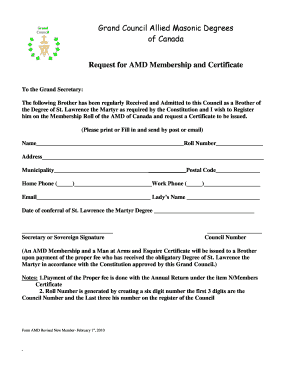
This guide provides step-by-step instructions for filling out the Allied Masonic Degrees Canada membership request form. By following these instructions, users will ensure a smooth and efficient online submission process.
Follow the steps to complete your membership request form.
- Press the ‘Get Form’ button to obtain the membership request form and open it for completion.
- Begin by entering the name of the individual being registered in the 'Name' field. Ensure the spelling is accurate and complete.
- Fill in the 'Roll Number' field. This six-digit number should consist of the Council Number in the first three digits, followed by the individual's unique number within the council.
- Provide the complete 'Address' for the individual. Include necessary details such as street address, and ensure that it is clear and concise.
- Specify the 'Municipality' in which the individual resides. This helps with proper identification and geographic location.
- Input the 'Home Phone' number, ensuring to use the correct format that includes the area code.
- Include the 'Email' address for any correspondence related to the membership. Verify that it is correct to prevent any communication issues.
- If applicable, enter the 'Work Phone' number. This provides an additional point of contact, if necessary.
- Fill in the 'Lady’s Name' if pertinent. This section can be left blank if not applicable.
- Indicate the 'Date of conferral of St. Lawrence the Martyr Degree' in the designated field to provide context for the application.
- Gather the 'Secretary or Sovereign Signature' required to validate the request. This signature confirms that the individual has been admitted to the council.
- Enter the 'Council Number,' ensuring it matches the number assigned to the council which the individual has been received into.
- Once all fields are completed, review the entries for accuracy. You may then save changes, download the form, print it, or prepare to share it via email.
Complete your request for membership online efficiently today.
Noteworthy Canadian Masons include Sir Allan N. MACNAB, John R. ROBERTSON, Joseph BRANT, Sir John ROSE, John D. EATON, NS Premier John M.
Industry-leading security and compliance
US Legal Forms protects your data by complying with industry-specific security standards.
-
In businnes since 199725+ years providing professional legal documents.
-
Accredited businessGuarantees that a business meets BBB accreditation standards in the US and Canada.
-
Secured by BraintreeValidated Level 1 PCI DSS compliant payment gateway that accepts most major credit and debit card brands from across the globe.