Loading
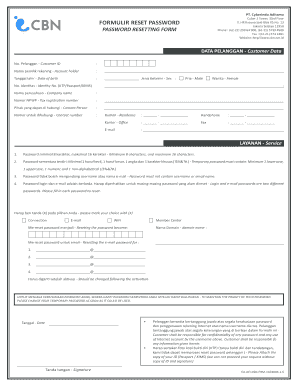
Get Pt. Cyberindo Aditama Cyber 2 Tower, 33rd Floor Formulir ... - Cbn Net
How it works
-

Open form follow the instructions
-

Easily sign the form with your finger
-

Send filled & signed form or save
How to fill out the PT. Cyberindo Aditama Cyber 2 Tower, 33rd Floor FORMULIR RESET PASSWORD online
Filling out the PT. Cyberindo Aditama password resetting form can seem daunting, but with clear instructions, you can easily complete it online. This guide will walk you through each step of the form to ensure your password is reset efficiently.
Follow the steps to successfully complete the password resetting form.
- Click the ‘Get Form’ button to obtain the form and open it in your editor.
- Fill in your customer data. Provide your Customer ID in the designated field and ensure all information is accurate.
- Enter the name of the account holder, along with the date of birth. Make sure the information matches your official documents.
- Select your gender by marking the appropriate option. You can do this easily by placing an ‘X’ in the box next to your choice.
- Provide your identity number, which could be your KTP, passport, or KMIS. It is important for identity verification.
- Input your company name if applicable, along with your tax registration number (NPWP).
- Fill in your contact person's name and their contact number, ensuring to provide accurate details.
- Complete the residence and office address fields, along with providing your email and phone number.
- Create a new password. Remember, it must be at least 8 characters long and contain a mix of uppercase, lowercase, numeric, and special characters.
- Enter your temporary password in the required field, ensuring it meets the necessary criteria.
- Specify the domain name where you wish to reset the password, then list the email addresses for which you want the password reset.
- Ensure you have noted that the password should be changed immediately after activation to maintain its confidentiality.
- Include the date and your signature at the end of the form.
- Attach a photocopy of your identification (KTP/passport). Remember that processing cannot proceed without this document and your signature.
- Review all entered details for accuracy before submission. Once confirmed, save your changes and download the form. You can also choose to print or share it as necessary.
Complete your password resetting process online today!
Jika pembayaran belum diterima saat tanggal jatuh tempo, maka kami akan membekukan (freeze) sementara akun CBN Anda.
Industry-leading security and compliance
US Legal Forms protects your data by complying with industry-specific security standards.
-
In businnes since 199725+ years providing professional legal documents.
-
Accredited businessGuarantees that a business meets BBB accreditation standards in the US and Canada.
-
Secured by BraintreeValidated Level 1 PCI DSS compliant payment gateway that accepts most major credit and debit card brands from across the globe.