Loading
Get Form Dllr Oui 15
How it works
-

Open form follow the instructions
-

Easily sign the form with your finger
-

Send filled & signed form or save
How to fill out the Form Dllr Oui 15 online
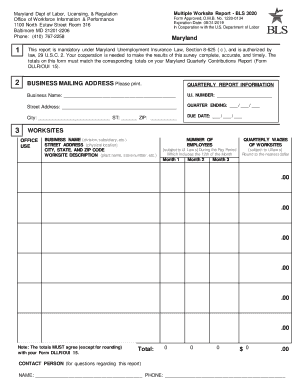
Filling out the Form Dllr Oui 15 is an essential process for reporting employment and wages across multiple work locations. This guide will provide you with clear instructions to successfully complete the form online, ensuring accurate and timely submission.
Follow the steps to successfully complete your form online.
- Click the ‘Get Form’ button to obtain the form and open it in your preferred editing tool.
- Review the business name, contact name, and mailing address in Section 2. Make any necessary corrections to ensure all information is accurate.
- Examine the worksites list in Section 3. Ensure that the name and physical location address for each worksite is correct. Add any unique identifiers, like plant names or store numbers, if necessary.
- Input employment figures for each month of the quarter. This should include the total number of full-time and part-time employees who worked during or received pay for the pay period that includes the 12th of the month.
- Enter the wages paid during the quarter that are subject to State Unemployment Insurance laws. Remember to round the wages to the nearest dollar.
- Explain any large changes in employment or wages next to the applicable worksite. This can include reasons such as store closings or seasonal variations.
- If a worksite has closed or been sold, note this next to the worksite information, including the closure date and the name of the purchasing company if applicable.
- Check if the list in Section 3 is complete. If any worksite is missing, provide the required details for those additional sites using the blank lines provided or by attaching a separate page.
- Complete the Totals section at the end of the list by summing the number of employees and wages for all worksites for each month, ensuring these figures match with the totals on your Maryland Quarterly Contributions Report.
- Return your completed form using the provided envelope to the central processing facility.
Ensure your documents are filled out correctly and submit them online for processing.
Employers should to respond to any telephone message and/or request for information within 48 hours, otherwise a determination will be made based on the information provided by the worker. For more information on what to expect during this call, check out page 23 of this guide.