Loading
Form preview
  • US Legal Forms
  • Form Library
  • More Forms
  • More Uncategorized Forms
  • Trial Exhibit Labels Ib

Get Trial Exhibit Labels Ib

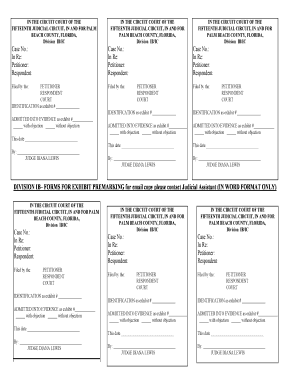
IN THE CIRCUIT COURT OF THE FIFTEENTH JUDICIAL CIRCUIT, IN AND FOR PALM BEACH COUNTY, FLORIDA, Division IB/IC IN THE CIRCUIT COURT OF THE FIFTEENTH JUDICIAL CIRCUIT, IN AND FOR PALM BEACH COUNTY,.

How it works

  1. Open form

    Open form follow the instructions

  2. Easily sign form

    Easily sign the form with your finger

  3. Share form

    Send filled & signed form or save

How to fill out the Trial Exhibit Labels IB online

Filling out the Trial Exhibit Labels IB is a crucial step in the documentation process for your case. This guide will walk you through the necessary steps to accurately complete the form online, ensuring that you meet all requirements.

Follow the steps to successfully complete the Trial Exhibit Labels IB.

  1. Click ‘Get Form’ button to access the Trial Exhibit Labels IB and open it in your preferred editing interface.
  2. Begin by entering the case number in the designated field. Make sure to double-check this number for accuracy, as it is essential for identifying your case.
  3. Next, populate the 'In Re' section with the relevant details, including the names of the petitioner and respondent. This information is critical for the court's understanding of the parties involved.
  4. Indicate who is filing the document by selecting either 'petitioner' or 'respondent' in the filed by section. You should ensure that the appropriate party is recognized.
  5. Fill in the identification section with the number assigned to the exhibit. This should correspond with other documentation for clarity.
  6. In the next field, indicate whether the exhibit is being admitted into evidence with or without objection. This step is pivotal in determining the nature of the exhibits related to your case.
  7. Complete the date fields with the appropriate date for when the exhibit is being submitted. It is crucial to keep accurate records.
  8. Finally, ensure that the form is signed by the relevant parties. If a judge is required to sign, make sure to leave space for them accordingly.
  9. Once you have made all the necessary inputs, review the form for any typos or errors before proceeding to save, download, print, or share the completed document.

Complete your Trial Exhibit Labels IB online today to ensure your documents are prepared accurately and efficiently.

Get form

Experience a faster way to fill out and sign forms on the web. Access the most extensive library of templates available.
Get form

Related content

1 STANDARD ATTACHMENTS FOR CIVIL CASES ...
Trial Exhibit Form . ... As noted in I.B. above, a party must support each proposed...
Learn more
A Single Arm, Open-Label Pilot Study of ABT-199...
Aug 18, 2020 — A Single Arm, Open-Label Pilot Study of ABT-199 (Venetoclax) for...
Learn more
2008 Saturn AURA Owner Manual - Owner's Manual
There are also warning labels on the vehicle which use the same ... suddenly become a 240...
Learn more

Related links form

Georgia Sales Tax AUDIOMETER MONTHLY BIOLOGICAL CALIBRATION CHECK - Dshs Texas Formulario 3283 Re-Certification Information - Iahcsmm

Questions & Answers

Get answers to your most pressing questions about US Legal Forms API.

Contact support

Here's all you have to do: Pre-mark the exhibit. Show it to opposing counsel. Show it to the witness. Ask the right predicate questions. Ask the court to admit the exhibit (see below for magic terminology) Let the clerk mark the exhibit into evidence.

At depositions, of your witness or theirs, there are two actions you almost always should take (whether you represent the deponent or are adverse to the deponent). If a physical or electronic item produced at the deposition is important to your side of the case, say: “I offer Deposition Exhibit X into evidence.”

In the office, courtroom, or judge's chambers, exhibit labels help eliminate the costly time spend searching for and referencing exhibits. They mark the subject so it can be identified at a glance.

Foundation is formed from three elements: Authenticity; Reliability; and Relevance must be established before an exhibit can be admitted as evidence. [When you are ready to introduce an exhibit, pause and retrieve two copies of the exhibit from your table.] Lawyer: “Your honor may I approach the witness?”

STEP 1: Secure the Evidence Properly. STEP 2: Maintain the Chain of Custody at All Times. STEP 3: Verify the Authenticity of the Video Evidence. STEP 4: Sort the Video Evidence ing to Its Relevancy. STEP 5: Convert the Video Evidence to the Right Format. STEP 6: Review How to Present the Video Exhibits in Court.

There are three main types of trial exhibits. They are often classified as real, illustrative, or demonstrative evidence.

The plaintiff's exhibits are traditionally numbered (“Exhibit 1”), while the defendant's exhibits are lettered (“Exhibit A”). Your court may want you to label your own exhibits as you introduce them or the court may prefer that the court clerk labels the exhibits instead.

Here's all you have to do: Pre-mark the exhibit. Show it to opposing counsel. Show it to the witness. Ask the right predicate questions. Ask the court to admit the exhibit (see below for magic terminology) Let the clerk mark the exhibit into evidence.

Get This Form Now!

Use professional pre-built templates to fill in and sign documents online faster. Get access to thousands of forms.
Get form
If you believe that this page should be taken down, please follow our DMCA take down processhere.

Industry-leading security and compliance

US Legal Forms protects your data by complying with industry-specific security standards.
  • In businnes since 1997
    25+ years providing professional legal documents.
  • Accredited business
    Guarantees that a business meets BBB accreditation standards in the US and Canada.
  • Secured by Braintree
    Validated Level 1 PCI DSS compliant payment gateway that accepts most major credit and debit card brands from across the globe.
Get Trial Exhibit Labels IB
Get form
  • Adoption
  • Bankruptcy
  • Contractors
  • Divorce
  • Home Sales
  • Employment
  • Identity Theft
  • Incorporation
  • Landlord Tenant
  • Living Trust
  • Name Change
  • Personal Planning
  • Small Business
  • Wills & Estates
  • Packages A-Z
  • Affidavits
  • Bankruptcy
  • Bill of Sale
  • Corporate - LLC
  • Divorce
  • Employment
  • Identity Theft
  • Internet Technology
  • Landlord Tenant
  • Living Wills
  • Name Change
  • Power of Attorney
  • Real Estate
  • Small Estates
  • Wills
  • All Forms
  • Forms A-Z
  • Form Library
  • Legal Hub
  • About Us
  • Help Portal
  • Legal Resources
  • Blog
  • Affiliates
  • Contact Us
  • Delete My Account
  • Site Map
  • Industries
  • Forms in Spanish
  • Localized Forms
  • State-specific Forms
  • Forms Kit
  • Real Estate Handbook
  • All Guides
  • Notarize
  • Incorporation services
  • For Consumers
  • For Small Business
  • For Attorneys
  • USLegal
  • FormsPass
  • pdfFiller
  • signNow
  • altaFlow
  • DocHub
  • Instapage
Form Packages
  • Adoption
  • Bankruptcy
  • Contractors
  • Divorce
  • Home Sales
  • Employment
  • Identity Theft
  • Incorporation
  • Landlord Tenant
  • Living Trust
  • Name Change
  • Personal Planning
  • Small Business
  • Wills & Estates
  • Packages A-Z
Form Categories
  • Affidavits
  • Bankruptcy
  • Bill of Sale
  • Corporate - LLC
  • Divorce
  • Employment
  • Identity Theft
  • Internet Technology
  • Landlord Tenant
  • Living Wills
  • Name Change
  • Power of Attorney
  • Real Estate
  • Small Estates
  • Wills
  • All Forms
  • Forms A-Z
  • Form Library
Customer Service
  • Legal Hub
  • About Us
  • Help Portal
  • Legal Resources
  • Blog
  • Affiliates
  • Contact Us
  • Delete My Account
  • Site Map
  • Industries
  • Forms in Spanish
  • Localized Forms
  • State-specific Forms
  • Forms Kit
Legal Guides
  • Real Estate Handbook
  • All Guides
Prepared for you
  • Notarize
  • Incorporation services
Our Customers
  • For Consumers
  • For Small Business
  • For Attorneys
Our Sites
  • USLegal
  • FormsPass
  • pdfFiller
  • signNow
  • altaFlow
  • DocHub
  • Instapage
Social Media
Call us now toll free:
+1 833 426 79 33
As seen in:
© Copyright 1999-2026 airSlate Legal Forms, Inc. 3720 Flowood Dr, Flowood, Mississippi 39232
  • Your Privacy Choices
  • Terms of Service
  • Privacy Notice
  • Content Takedown Policy
  • Bug Bounty Program