Loading
Get (775)324-2400 Option 3
How it works
-

Open form follow the instructions
-

Easily sign the form with your finger
-

Send filled & signed form or save
How to fill out the (775)324-2400 Option 3 online
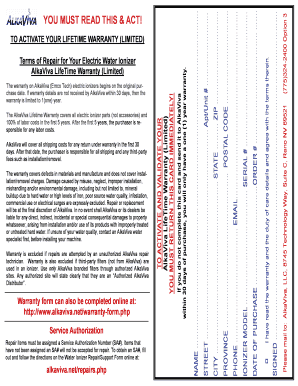
This guide provides step-by-step instructions for completing the (775)324-2400 Option 3 form online. Whether you are activating your warranty or seeking repairs for your water ionizer, this comprehensive guide aims to simplify the process for all users.
Follow the steps to successfully complete the form online.
- Press the ‘Get Form’ button to access the online form and open it for editing.
- Fill in your name in the designated field. Ensure that all names are entered clearly and correctly.
- Enter the date of purchase in the appropriate section, using the format specified on the form.
- Provide your order number. This information can usually be found on your receipt or order confirmation.
- Input the model and serial number of your ionizer in the specified fields.
- Specify your phone number and email address. Ensure both are accurate for any communication regarding your form.
- Complete the address fields, including street, apartment/unit number (if applicable), city, state, province, and postal code.
- Review all entered information to ensure accuracy before proceeding.
- If applicable, confirm you have read and agree with the warranty and duty of care details by checking the required box.
- Once all sections are filled out correctly, save your changes. You may also download, print, or share the form as needed.
Complete your (775)324-2400 Option 3 form online today and ensure your water ionizer is properly documented!