Loading
Form preview
  • US Legal Forms
  • Form Library
  • More Forms
  • More Uncategorized Forms
  • Dyadic Adjustment Scale

Get Dyadic Adjustment Scale

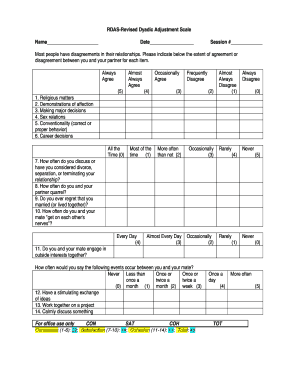
RDASRevised Dyadic Adjustment Scale Name Date Session # Most people have disagreements in their relationships. Please indicate below the extent of agreement or disagreement between you and your partner.

How it works

  1. Open form

    Open form follow the instructions

  2. Easily sign form

    Easily sign the form with your finger

  3. Share form

    Send filled & signed form or save

How to fill out the Dyadic Adjustment Scale online

The Dyadic Adjustment Scale is a valuable tool for assessing the quality of relationships. Completing this scale online ensures a streamlined process, enabling you to reflect on various aspects of your partnership effectively.

Follow the steps to complete the Dyadic Adjustment Scale online

  1. Press the ‘Get Form’ button to access the Dyadic Adjustment Scale and open it in the editor.
  2. Begin by entering your name and the date of completion at the designated fields at the top of the form.
  3. Indicate the session number in the corresponding field. This helps keep track of multiple assessments.
  4. For each statement provided, evaluate the extent of agreement or disagreement you feel with your partner on a scale from 'Never' to 'Always Agree.' Choose the response that best describes your feelings for each item.
  5. Pay particular attention to questions about significant relationship aspects, such as emotional connection and decision-making. Reflect on these areas carefully.
  6. After you complete each statement, ensure you keep track of your scores by following the scoring instructions provided in the form.
  7. Calculate your scores based on the guidance: Total your responses according to the scoring rules for consensus, satisfaction, and cohesion sections.
  8. Once all items are scored, review your answers to ensure they accurately reflect your relationship dynamics.
  9. Finally, save any changes you made, download the document, or print it for your records.

Begin your assessment today by completing the Dyadic Adjustment Scale online.

Get form

Experience a faster way to fill out and sign forms on the web. Access the most extensive library of templates available.
Get form

Related content

Factorial Invariance of the Dyadic Adjustment...
The Dyadic Adjustment Scale (Spanier, 1976) is the most widely used inventory of...
Learn more
Dyadic Adjustment Scale (DAS) – Addiction...
Items 1 - 22 — The Dyadic Adjustment Scale (DAS) is a 32-item questionnaire that...
Learn more
Revised Dyadic Adjustment Scale Scoring...
Revised Dyadic Adjustment Scale Scoring Instructions...
Learn more

Related links form

Ts 12 Form 175388050 Dhcq 16 2 653 Arizona Superior Court, Pima County - Arizona Superior Court In Pima ... - Sc Pima

Questions & Answers

Get answers to your most pressing questions about US Legal Forms API.

Contact support

The Dyadic Adjustment Scale (DAS-7), sometimes referred to as the Abbreviated Dyadic Adjustment Scale (ADAS, Hunsley et al., 2001), is a 7-item measure designed to assess the relationship quality of intact couples.

The Dyadic Adjustment Scale (DAS, or sometimes, DAS-32) is a 32-item, self-report measure of an individual's perception of his/her relationship with an intimate partner. The DAS is widely used to assess relationship satisfaction and to evaluate how each partner within the couple perceives his or her relationship.

The Dyadic Adjustment Scale (DAS-32) is a 32-item measure designed to assess the relationship quality of intact (married or cohabiting) couples.

The Dyadic Adjustment Scale (DAS-32) is a 32-item measure designed to assess the relationship quality of intact (married or cohabiting) couples.

Scores on the RDAS range from 0 to 69 with higher scores indicating greater relationship satisfaction and lower scores indicating greater relationship distress. The cut-off score for the RDAS is 48 such that scores of 48 and above indicate non-distress and scores of 47 and below indicate marital/relationship distress.

Scores on the RDAS range from 0 to 69 with higher scores indicating greater relationship satisfaction and lower scores indicating greater relationship distress. The cut-off score for the RDAS is 48 such that scores of 48 and above indicate non-distress and scores of 47 and below indicate marital/relationship distress.

The Dyadic Adjustment Scale (DAS; Spanier, 1976) is currently the most widely utilized self-report measure of relationship adjustment1 in the social and behavioral sciences. A 32-item measure developed for married couples or similar dyads, it can be employed in self-report or interview format.

So, marital adjustment is a concept of multiple components that consider not only individual but also relationship with his/her partner (23, 24). Spanierin 1974, developed Dyadic Adjustment Scale (DAS) for assessing marital adjustment and ithas been accepted by researchers and clinicians (25-27).

Get This Form Now!

Use professional pre-built templates to fill in and sign documents online faster. Get access to thousands of forms.
Get form
If you believe that this page should be taken down, please follow our DMCA take down processhere.

Industry-leading security and compliance

US Legal Forms protects your data by complying with industry-specific security standards.
  • In businnes since 1997
    25+ years providing professional legal documents.
  • Accredited business
    Guarantees that a business meets BBB accreditation standards in the US and Canada.
  • Secured by Braintree
    Validated Level 1 PCI DSS compliant payment gateway that accepts most major credit and debit card brands from across the globe.
Get Dyadic Adjustment Scale
Get form
  • Adoption
  • Bankruptcy
  • Contractors
  • Divorce
  • Home Sales
  • Employment
  • Identity Theft
  • Incorporation
  • Landlord Tenant
  • Living Trust
  • Name Change
  • Personal Planning
  • Small Business
  • Wills & Estates
  • Packages A-Z
  • Affidavits
  • Bankruptcy
  • Bill of Sale
  • Corporate - LLC
  • Divorce
  • Employment
  • Identity Theft
  • Internet Technology
  • Landlord Tenant
  • Living Wills
  • Name Change
  • Power of Attorney
  • Real Estate
  • Small Estates
  • Wills
  • All Forms
  • Forms A-Z
  • Form Library
  • Legal Hub
  • About Us
  • Help Portal
  • Legal Resources
  • Blog
  • Affiliates
  • Contact Us
  • Delete My Account
  • Site Map
  • Industries
  • Forms in Spanish
  • Localized Forms
  • State-specific Forms
  • Forms Kit
  • Real Estate Handbook
  • All Guides
  • Notarize
  • Incorporation services
  • For Consumers
  • For Small Business
  • For Attorneys
  • USLegal
  • FormsPass
  • pdfFiller
  • signNow
  • altaFlow
  • DocHub
  • Instapage
Form Packages
  • Adoption
  • Bankruptcy
  • Contractors
  • Divorce
  • Home Sales
  • Employment
  • Identity Theft
  • Incorporation
  • Landlord Tenant
  • Living Trust
  • Name Change
  • Personal Planning
  • Small Business
  • Wills & Estates
  • Packages A-Z
Form Categories
  • Affidavits
  • Bankruptcy
  • Bill of Sale
  • Corporate - LLC
  • Divorce
  • Employment
  • Identity Theft
  • Internet Technology
  • Landlord Tenant
  • Living Wills
  • Name Change
  • Power of Attorney
  • Real Estate
  • Small Estates
  • Wills
  • All Forms
  • Forms A-Z
  • Form Library
Customer Service
  • Legal Hub
  • About Us
  • Help Portal
  • Legal Resources
  • Blog
  • Affiliates
  • Contact Us
  • Delete My Account
  • Site Map
  • Industries
  • Forms in Spanish
  • Localized Forms
  • State-specific Forms
  • Forms Kit
Legal Guides
  • Real Estate Handbook
  • All Guides
Prepared for you
  • Notarize
  • Incorporation services
Our Customers
  • For Consumers
  • For Small Business
  • For Attorneys
Our Sites
  • USLegal
  • FormsPass
  • pdfFiller
  • signNow
  • altaFlow
  • DocHub
  • Instapage
Social Media
Call us now toll free:
+1 833 426 79 33
As seen in:
© Copyright 1999-2026 airSlate Legal Forms, Inc. 3720 Flowood Dr, Flowood, Mississippi 39232
  • Your Privacy Choices
  • Terms of Service
  • Privacy Notice
  • Content Takedown Policy
  • Bug Bounty Program