Loading
Get Earlylearningwa
How it works
-

Open form follow the instructions
-

Easily sign the form with your finger
-

Send filled & signed form or save
How to fill out the Earlylearningwa online
This guide provides step-by-step instructions for filling out the Earlylearningwa form effectively and accurately. Ensure that you have all necessary information and documents on hand for a smooth experience.
Follow the steps to complete the Earlylearningwa form online.
- Press the ‘Get Form’ button to obtain the form and open it in your preferred editing tool.
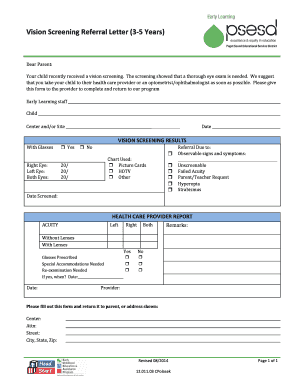
- In the 'Child' section, provide the name of the child receiving the vision screening.
- In the 'Center and/or Site' field, indicate the name of the educational institution or location associated with the child.
- If applicable, mark whether the child wears glasses by selecting 'Yes' or 'No'.
- In the 'Vision Screening Results' section, input the vision results for the right eye, left eye, and both eyes. Use the appropriate notations for the results.
- Select the chart used for the vision screening by checking one of the options: Picture Cards, HOTV, or Other.
- In the 'Referral Due to' section, tick the observable signs and symptoms that apply. Provide any additional details if necessary.
- Record the date when the screening took place.
- For the 'Health Care Provider Report,' indicate the acuity results without lenses and with lenses for both eyes.
- Specify whether glasses are prescribed, special accommodations are needed, or re-examination is required. If re-examination is needed, include the date.
- Fill in the provider's name and their remarks, if any.
- Finally, ensure that the form is completed and return it to the designated address. Options to save changes, download, print, or share the form will be available.
Complete your documents online today to ensure timely processing.
(1) Food prepared and served from an early learning program must not be tampered with or spoiled.
Industry-leading security and compliance
US Legal Forms protects your data by complying with industry-specific security standards.
-
In businnes since 199725+ years providing professional legal documents.
-
Accredited businessGuarantees that a business meets BBB accreditation standards in the US and Canada.
-
Secured by BraintreeValidated Level 1 PCI DSS compliant payment gateway that accepts most major credit and debit card brands from across the globe.