Loading
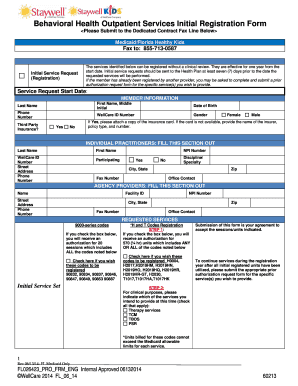
Get Bh Initial Outpatient Service Registration Form - Wellcare
How it works
-

Open form follow the instructions
-

Easily sign the form with your finger
-

Send filled & signed form or save
How to fill out the BH Initial Outpatient Service Registration Form - WellCare online
Filling out the BH Initial Outpatient Service Registration Form - WellCare online is a crucial step in accessing behavioral health outpatient services. This guide will walk you through the process step-by-step, ensuring that you provide all necessary information accurately.
Follow the steps to complete the form effectively.
- Click ‘Get Form’ button to obtain the form and open it in your preferred online editor.
- Begin by filling in the member information section. Provide the last name, first name, middle initial, date of birth, phone number, WellCare ID number, and gender. If there is third-party insurance, indicate 'Yes' or 'No' and attach a copy of the insurance card if available, or provide the insurer's name, policy type, and number.
- If you are an individual practitioner, complete that section by providing your last name, first name, WellCare ID number, street address, phone number, participating status, NPI number, discipline/specialty, city, state, and zip code.
- For agency providers, fill in the respective section with the agency name, NPI number, facility ID, street address, phone number, city, state, zip code, and office contact.
- In the requested services section, select the 9000-series codes by checking the appropriate box if you wish those codes to be registered. Include the related codes 90832, 90834, 90837, etc.
- For the initial service set, check the box if you wish the H and T codes to be registered, including the relevant codes listed.
- Confirm that the submission of this form indicates your agreement to accept the indicated sessions/units.
- Indicate which services you intend to provide by checking all applicable options in the clinical purposes section, such as therapy services, TCM, TBOS, or PSR.
- Once all sections are filled out, review the information for accuracy. You can save changes, download, print, or share the completed form as needed.
Complete the BH Initial Outpatient Service Registration Form online today to ensure timely access to necessary services.
Industry-leading security and compliance
US Legal Forms protects your data by complying with industry-specific security standards.
-
In businnes since 199725+ years providing professional legal documents.
-
Accredited businessGuarantees that a business meets BBB accreditation standards in the US and Canada.
-
Secured by BraintreeValidated Level 1 PCI DSS compliant payment gateway that accepts most major credit and debit card brands from across the globe.