Loading
Get Uk Scotland M10 2015-2026
How it works
-

Open form follow the instructions
-

Easily sign the form with your finger
-

Send filled & signed form or save
How to fill out the UK Scotland M10 online
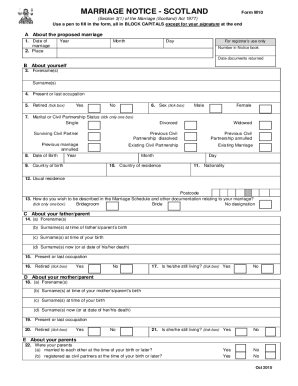
This guide provides step-by-step instructions on completing the Marriage Notice Application Form M10, which is essential for anyone planning to marry in Scotland. It is designed to help users understand the requirements and provide clarity, ensuring a smooth application process.
Follow the steps to complete the M10 form with ease.
- Click ‘Get Form’ button to obtain the form and open it in the editor.
- In Section A1, enter your proposed date of marriage by specifying the year, month, and day. Ensure this date is at least 29 days away but not more than three months from your notice submission to comply with legal requirements.
- In Section A2, provide the place where the marriage will be conducted. This should be the registration district where the wedding is set to take place.
- Proceed to Section B, and fill in your forename(s) and surname(s) as the first required information. Then, indicate your present or last occupation, and check the box if you are retired.
- Indicate your sex by ticking the appropriate box, and select your marital or civil partnership status by ticking only one box from the options provided.
- Enter your date of birth, including the year, month, and day. Following this, state your country of birth and country of residence.
- Provide your nationality and enter your usual residence, including postcode, in Section B.
- Specify how you wish to be described in the Marriage Schedule, selecting from the options provided: Bridegroom, Bride, or No designation.
- In Section C, provide information about your father or parent, including their forename(s), surname(s) at the time of their birth and your birth, current surname if applicable, present occupation, and whether they are still living.
- Complete Section D with similar details about your mother or parent as outlined for Section C.
- In Section E, indicate whether your parents were married to each other or registered as civil partners at the time of your birth.
- Proceed to Section F if you are having your marriage solemnised by someone other than a registrar, entering the person's name and their denomination or body.
- Section G requires you to fill in the details of the other party to the marriage, including their forename(s), surname(s), and usual residence.
- In Section H, confirm that you have enclosed the necessary documents, such as birth certificates and any divorce or civil partnership dissolution documents, ticking 'YES' or 'NO' as required for each applicable page.
- Finally, complete the declaration at the end of the form, ensuring that all information provided is true and accurate. Sign and date the form.
Complete your application for the Marriage Notice Form M10 online to ensure a smooth wedding process.
Related links form
You can obtain your M10 form in Scotland from the local registrar's office or the official government website. The M10 form is essential for various aspects of the marriage process, ensuring your marriage is legally recognized. Using uslegalforms can make it easier to navigate these requirements and ensure all your documents are in order.