Loading
Get Sbrpa
How it works
-

Open form follow the instructions
-

Easily sign the form with your finger
-

Send filled & signed form or save
How to fill out the Sbrpa online
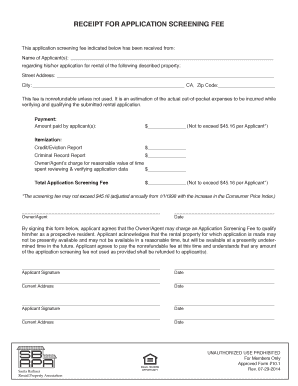
Filling out the Sbrpa, or application screening fee receipt form, is essential for prospective renters. This guide will provide you with clear and concise steps to complete the form accurately online.
Follow the steps to fill out the form correctly.
- Click the ‘Get Form’ button to access the form and open it in your preferred editor.
- In the first section, enter the name(s) of the applicant(s). Ensure that the spelling and order are correct for processing.
- Next, fill in the property details, including the street address, city, and ZIP code. Double-check for accuracy.
- In the payment section, record the amount paid by the applicant(s) for the screening fee.
- Detail the itemization of the screening fee. Break down the costs for the credit/eviction report and the criminal record report, while ensuring the total does not exceed $45.16 per applicant.
- Include the owner's or agent's reasonable charge for time spent reviewing the application data in the specified field.
- Calculate the total application screening fee and enter this amount at the end of the itemization section.
- The next step is for the owner/agent to sign and date the form, confirming their role in processing the application.
- Each applicant must sign and date beneath the acknowledgment statement, confirming understanding of the screening fee and its nonrefundable nature.
- After completing all fields, you may save your changes, download the form for your records, print it for submission, or share the completed form as necessary.
Complete your documents online efficiently and accurately today.