in one session. This form will only work if you: • save it to your computer, then � • open it in Acrobat Reader version 8.1.2 or later. � The form will not work in: • older versions of Acrobat Reader • other pdf readers, for example Preview on a Mac or Foxit on a PC • your web browser window. If you are having technical difficulties: • downloading the form • Navigating around the form, or • printing the form Please contact the eService helpdesk. Phone: 0845 601 80 40 Minicom.
Open form follow the instructions
Easily sign the form with your finger
Send filled & signed form or save
How to fill out the UK Form ESA50 online
Filling out the UK Form ESA50 online can seem daunting, but with the right guidance, you can complete it effectively. This form is crucial for individuals claiming benefits due to limited capability for work, as it evaluates how physical and mental health impacts daily functioning.
Follow the steps to successfully complete the ESA50 form.
- Click ‘Get Form’ button to obtain the form and open it in a compatible PDF editor. Ensure you are using Adobe Reader version 8.1.2 or later for proper functionality.
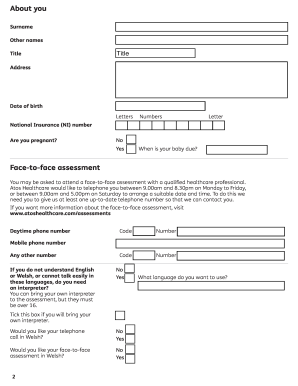
- Begin by selecting your title, entering your surname, and other names in the designated fields. Provides your address and date of birth in the respective sections.
- Fill in your National Insurance number and indicate whether you are pregnant, specifying the due date if applicable.
- Provide up-to-date contact information, including your daytime and mobile phone numbers, which may be used for arranging a face-to-face assessment.
- Detail your treatment history and any medical professionals involved in your care. Include their names, addresses, and phone numbers as needed.
- Answer specific questions about your illnesses or disabilities in a comprehensive manner, detailing how they affect daily activities.
- Identify any medications you are taking, along with any side effects they may cause, and provide additional information if more space is required.
- Complete sections about your physical functions, mental, cognitive, and intellectual functions by describing your capabilities and any assistance you may require.
- After completing all sections, review your responses for accuracy. Make sure to sign and date the form appropriately.
- Save your changes, and then choose to either download, print, or share the completed form as required for submission.
Complete your UK Form ESA50 online today to ensure your benefits claim is processed smoothly.
Experience a faster way to fill out and sign forms on the web. Access the most extensive library of templates available.
Related content
by D Padfield · 2012 — ESA50 medical questionnaire, sent by Atos Healthcare to the...
by L Rabinovich · 2021 · Cited by 2 — 23 The form is available here: ... Ending...
Dec 20, 2016 — This Conservation Management Plan (Plan) delineates reasonable actions...
Get answers to your most pressing questions about US Legal Forms API.
How to fill in ESA50 form?
Filling in the UK Form ESA50 requires careful attention to detail. Start by reading each question thoroughly, and then answer based on your personal experience. Use specific examples to illustrate your situation, and don’t hesitate to seek assistance from resources like uslegalforms to ensure your application is complete and accurate.
How long does it take to get ESA50 form?
The time to receive the UK Form ESA50 can vary depending on the processing times of your local Jobcentre. Generally, it might take a few days to a couple of weeks to receive your form after you apply for ESA. If you need the form quickly, consider accessing it through the uslegalforms platform for immediate downloads.
How do you score 15 points in a Work Capability Assessment?
To score 15 points in a Work Capability Assessment, you need to clearly detail your limitations in daily living. The UK Form ESA50 breaks down various activities you will be assessed on, so ensure that your answers reflect your true abilities and challenges. It’s important to be descriptive and provide evidence from your health history.
How to answer ESA assessment questions?
When answering ESA assessment questions, be clear and concise. Use the UK Form ESA50 to guide your responses, focusing on how your health affects your daily life. Providing specific examples and being honest about your circumstances can improve your chances of a favorable assessment.
How do you score points on a Work Capability Assessment?
Scoring points on a Work Capability Assessment involves detailing how your health conditions limit your ability to work. You will receive points for various activities based on how these limitations affect your daily life. It's essential to be thorough and honest in your application, especially when using the UK Form ESA50.
How do you get 15 points on UC50?
To achieve 15 points on the UC50, you need to provide clear evidence of the limitations you face. Focus on detailing how your conditions affect your daily living and mobility. The scoring is based on specific criteria, so make sure to relate your personal experience directly to each criterion outlined in the assessment.
What is the difference between UC50 and ESA50?
The UC50 and UK Form ESA50 serve different benefits. The UC50 is used for Universal Credit claims, while the UK Form ESA50 is specifically for Employment and Support Allowance. When applying for ESA, it's crucial to use the correct form to ensure that your assessment reflects your needs accurately.
How do I get an ESA UK?
To apply for ESA in the UK, you first need to complete the UK Form ESA50, which assesses your ability to work. You can submit your form online or in paper format. It is crucial to provide detailed information about your health and work capacity to ensure the best outcome in your application.
How to get a State Pension statement in the UK?
To obtain your State Pension statement in the UK, you can request it online through the official government website. You will need to provide some personal information for verification. For those who prefer, uslegalforms also provides guidance on how to request and track your statement efficiently.
How long does ESA take to process?
Processing your ESA claim, including reviewing the UK Form ESA50, generally takes around five weeks. However, this can vary depending on the complexity of your case and the workload at the processing center. Timely submission of your ESA50 can help in speeding up this process.
Use professional pre-built templates to fill in and sign documents online faster. Get access to thousands of forms.
If you believe that this page should be taken down, please follow our DMCA take down process here.
This form is available in several versions. Select the version you need from the drop-down list below.