Loading
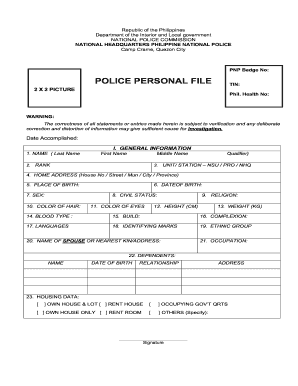
Get Ph Police Personal File
How it works
-

Open form follow the instructions
-

Easily sign the form with your finger
-

Send filled & signed form or save
How to fill out the PH Police Personal File online
This guide provides clear, step-by-step instructions for completing the PH Police Personal File online. It aims to assist users in providing accurate and complete information in a professional manner.
Follow the steps to fill out your PH Police Personal File online.
- Use the 'Get Form' button to download the PH Police Personal File form and open it for editing.
- Begin by entering your general information in section I. This includes your name, rank, unit or station, home address, place of birth, date of birth, sex, civil status, religion, physical characteristics, languages spoken, and identifying marks.
- Proceed to section II, where you will provide details concerning your appointment and experience. Fill in effective dates of your appointment and promotion status along with the relevant authority.
- In section III, record your educational background, stipulating the level of education, name of institution, location, years attended, the degree completed or units earned, and any honors received.
- Section IV requires details on police or military training, including the course taken, school location, inclusive dates, and class standing.
- Complete section V by recording your NAPOLCOM, Civil Service, or PRC eligibility details, including examination titles, dates taken, and ratings obtained.
- For section VI, input your performance evaluation ratings for the immediately preceding two semesters, including the rating period, actual rating, and the name of the rater.
- Section VII pertains to your physical fitness test ratings over the last two semesters. Include the fitness periods and corresponding ratings.
- Fill out sections VIII and IX with information about your assets and liabilities for the past three fiscal years as well as individual income tax records.
- In sections X through XII, answer questions related to any offenses, previous dismissals or suspensions, and your physical and medical records.
- Section XIII requires you to list major designations held within your police or military service, detailing positions, units, and inclusive dates.
- Continue with section XIV, where you will document your promotion records, including old and new rank, effective dates, promotion status, and corresponding authorities.
- In section XV, indicate any additional courses, trainings, or seminars taken in your present rank, along with relevant details.
- Complete section XVI, listing firearms records including license number, kind, make, and issuing unit.
- Section XVII focuses on any awards and recognitions received during your service. Document the nature and date awarded.
- Finally, validate your information in section XVIII by certifying the correctness of your entries and providing your signature.
- Once you have completed the form, ensure all entries are correct, then you can save your changes, download, print, or share the completed form.
Begin filling out your PH Police Personal File online today!
Related links form
Benjamin C. a Jr. The PNP chief is also an ex officio member of the National Police Commission as a commissioner.