Loading
Get Pupil Registration Form 2016-2017 - Fonddulac K12 Wi
How it works
-

Open form follow the instructions
-

Easily sign the form with your finger
-

Send filled & signed form or save
How to fill out the PUPIL REGISTRATION FORM 2016-2017 - Fonddulac K12 Wi online
Completing the Pupil Registration Form for the Fonddulac K12 School District for the 2016-2017 school year is an essential step in ensuring your child is registered for school. This guide provides detailed instructions on how to fill out the form accurately and efficiently, facilitating a smooth online registration process.
Follow the steps to successfully complete the registration form online.
- Press the ‘Get Form’ button to access the pupil registration form online, making sure you have the document ready to fill out.
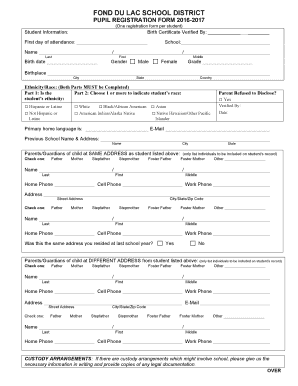
- Begin with the student information section. Enter the student's name, birth date, place of birth, and the first day of attendance in the specified fields.
- Indicate the student's gender by selecting either 'Male' or 'Female'.
- Complete the ethnicity/race section by first selecting the student's ethnicity and then choosing one or more options to indicate the student's race.
- Fill out the primary home language and email address for contact purposes.
- Provide the name and address of the previous school attended by the student, including the city and state.
- List the parents or guardians at the same address as the student. Include their names, relationship to the student, and contact information for both parents or guardians.
- If the parents or guardians live at a different address, complete that section with the necessary names and contact information.
- Address any custody arrangements if applicable, including noting legal documentation provided.
- Respond to the health concerns section by indicating if the student has any health concerns and if they have been identified for special education programs.
- Answer whether the student has a 504 plan or an Individualized Education Program (IEP). Indicate if they have been expelled from another district.
- List any other children living in the same household, providing their names, dates of birth, gender, grade, and school attending.
- Finally, certify the accuracy of the information by signing and dating the form as a parent or guardian.
- Once completed, ensure to save the changes and choose to download, print, or share the form as needed.
Complete your pupil registration form online today to ensure your child's enrollment for the upcoming school year.
What is residency documentation? Check with your chosen campus for guidance about what the district will require you to provide as proof of residency. You may be asked to provide a utility bill, lease agreement, or another item specified by the school.