Loading
Get Irs R 540ins 1 17
How it works
-

Open form follow the instructions
-

Easily sign the form with your finger
-

Send filled & signed form or save
How to fill out the Irs R 540ins 1 17 online
Filling out the Irs R 540ins 1 17 form can seem complex, but with clear guidance, you can navigate it successfully. This comprehensive guide breaks down each section of the form to support you in completing it accurately and efficiently.
Follow the steps to fill out the Irs R 540ins 1 17 online
- Click the ‘Get Form’ button to access the form and open it in your preferred editor.
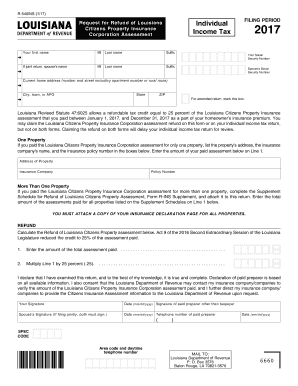
- Begin by entering your personal information, including your first name, middle initial, last name, and suffix, if applicable. If you are filing jointly, include your partner's name, middle initial, last name, and suffix.
- Indicate the filing period by selecting the year 2017.
- Enter your Social Security Number and your partner’s Social Security Number if filing jointly.
- Provide your current home address, including street number, apartment number if applicable, city or town, state, and ZIP code.
- If applicable, mark the box indicating you are filing an amended return.
- If you paid the Louisiana Citizens Property Insurance Corporation assessment for only one property, enter the property's address, the insurance company's name, and the policy number in the designated fields. Then, enter the amount of your paid assessment on Line 1.
- If you paid assessments for more than one property, complete the Supplement Schedule for Refund of Louisiana Citizens Property Assessment (Form R-INS Supplement) and attach it to your return. Enter the total amount of assessments from all properties listed on the Supplement Schedule on Line 1.
- Calculate your refund by entering the total assessment amount you have paid on Line 1, then multiply this amount by 25 percent (.25) and enter the result.
- Sign and date the form, as well as having your partner sign if filing jointly. If you used a paid preparer, their signature and contact information will also be necessary.
- Finally, mail your completed form to the Louisiana Department of Revenue at the provided address.
Complete your documents online to streamline your filing process.