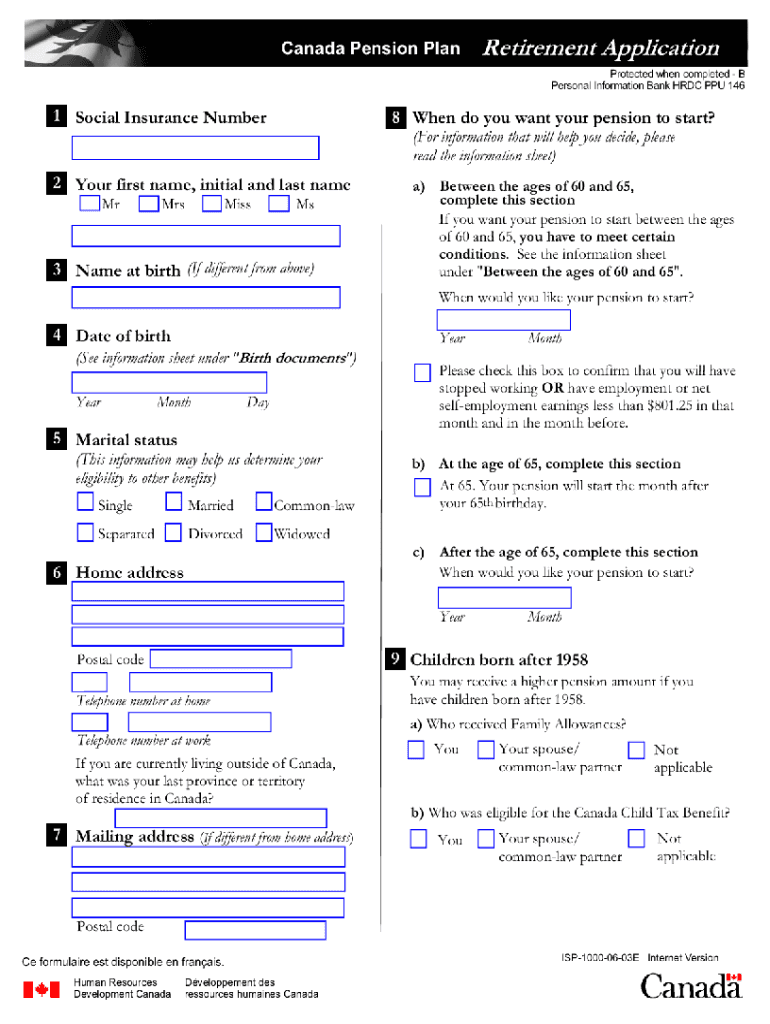
Canada Pension Plan Retirement Information Sheet This information sheet provides information on the Canada Pension Plan (CPP) retirement pension. It is also meant to help you decide when you would.
Loading

Open form follow the instructions

Easily sign the form with your finger

Send filled & signed form or save
How to fill out the Canada ISP-1000A-06-03E online
The Canada ISP-1000A-06-03E is an important document that requires careful completion to ensure accuracy and compliance. This guide will help you navigate the process of filling out the form online with clear, step-by-step instructions.
Follow the steps to successfully complete the form
- Click the ‘Get Form’ button to access the form and open it in your browser.
- Begin by filling out your personal information in the designated sections. This may include your full name, contact information, and any identification numbers required.
- Next, provide details relevant to the specific purpose of the form. This could include your current status or reason for submitting the document, ensuring all fields are completed accurately.
- Review additional sections that may require supporting information or documents. Make sure to attach any necessary files, if applicable, in the designated areas.
- Once all sections are filled out, take a moment to review the entire form for accuracy. Ensure that all provided information is correct and complete.
- Finally, you can save your changes, download the completed form for your records, print it out, or share it as needed using the available options.
Get started filling out your documents online today!
Experience a faster way to fill out and sign forms on the web. Access the most extensive library of templates available.
Related content
Mar 3, 2006 — Here is a draft of my attempt to put together a single list and view for...
by H Guo · Cited by 3 — Abstract—Active probing with ICMP is the center of many...
Thank you for choosing the Linksys by Cisco Wireless-N. Gigabit Router. The Router lets...
Get answers to your most pressing questions about US Legal Forms API.
What is ISP in Chrome?
ISP in Chrome usually refers to how your browser connects to your Internet Service Provider when you go online. It determines the speed and reliability of your browsing experience and can impact how quickly pages load or content streams. When exploring options for the best browsing experience, think about how different services can enhance your internet use. If questions arise, uslegalforms can assist you in making informed choices related to your online needs.
What is ISP 1000?
ISP 1000 generally refers to a specific plan or product in the realm of Internet Service Providers, typically offering high-speed internet solutions. However, when referring to Canada ISP-1000A-06-03E, it pertains to a specific connection type that promises reliable and fast service. If you are assessing options for internet services, you may want to compare plans from multiple ISPs to find the solution that aligns best with your needs.
How much CPP can you get at 60?
If you start collecting CPP benefits at age 60, you will receive a reduced amount compared to waiting until the standard retirement age. Current calculations estimate a reduction of about 36% from your full benefit at age 65. It’s essential to weigh the pros and cons of early retirement and think about your financial situation. To make informed decisions, consult uslegalforms for tools that can help you determine your best path.
What is an ISP retirement plan?
An ISP retirement plan refers to an Individual Savings Plan that helps individuals save for retirement in a tax-efficient manner. These plans often include options for various investment vehicles, enabling the growth of your savings over time. If you're interested in the details regarding Canada ISP-1000A-06-03E and how it can fit into your retirement strategy, uslegalforms provides resources to help you navigate your choices.
What is the pension system in Canada?
The pension system in Canada consists of several components designed to provide income in retirement. Primarily, it includes the Canada Pension Plan (CPP) and Old Age Security (OAS), which work together to support retirees financially. In addition, many Canadians benefit from private pensions and savings plans, further enhancing their retirement income. If you seek detailed information on structuring your retirement plan, consider using uslegalforms to explore your options.
What is ISP for IP?
ISP stands for Internet Service Provider, which is a company that offers access to the internet. Your ISP connects you to the web and often provides various services such as email, web hosting, and even cloud storage solutions. If you're exploring options related to Canada ISP-1000A-06-03E, it may be useful to check with your ISP about the best plans that fit your needs. They can guide you through available services and features.
How do I find out how much CPP I will get?
To find out how much Canada Pension Plan (CPP) you will receive, you can visit the official Canada Pension Plan website. There, you can use the online estimator tool to project your benefits based on your contributions. Remember, your eventual CPP amount can vary based on your retirement age and how much you've contributed over the years. Additionally, consider consulting uslegalforms for personalized guidance tailored to your unique circumstances.
How much will I get for CPP?
The amount you receive from CPP depends on your contributions during your working life and the age you decide to start receiving benefits. Generally, the average monthly amount at age 65 is around $1,200; however, exact figures vary based on individual circumstances. For detailed information regarding Canada ISP-1000A-06-03E, consult resources that can help calculate your potential benefits.
How to get GIS in Canada?
To qualify for the Guaranteed Income Supplement (GIS) in Canada, you must apply through Service Canada after applying for Old Age Security (OAS). Ensure you meet the income requirements, as GIS provides financial assistance to those with low income after retirement. Using platforms like US Legal can guide you through the application process related to Canada ISP-1000A-06-03E.
What is the easiest way to apply for CPP?
The easiest way to apply for Canada Pension Plan (CPP) is online through the Service Canada website. This streamlined process allows you to submit your application electronically, providing necessary personal information and documentation. Utilizing resources on the US Legal platform can further simplify your application process for Canada ISP-1000A-06-03E.
Use professional pre-built templates to fill in and sign documents online faster. Get access to thousands of forms.
If you believe that this page should be taken down, please follow our DMCA take down process here.
This form is available in several versions. Select the version you need from the drop-down list below.