Loading
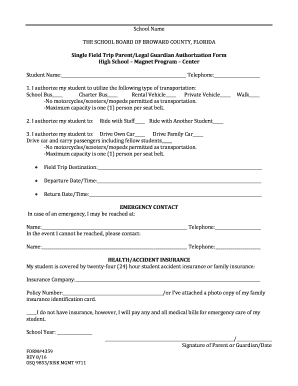
Get Single Field Trip Parent/legal Guardian Authorization Form - Broward K12 Fl
How it works
-

Open form follow the instructions
-

Easily sign the form with your finger
-

Send filled & signed form or save
How to fill out the Single Field Trip Parent/Legal Guardian Authorization Form - Broward K12 Fl online
Filling out the Single Field Trip Parent/Legal Guardian Authorization Form for Broward K12 Florida is essential for approving your child's participation in school field trips. This guide provides clear, step-by-step instructions to help you complete the form accurately and efficiently online.
Follow the steps to complete the authorization form online.
- Click ‘Get Form’ button to obtain the form and open it for editing.
- Enter your student’s name in the designated field where indicated. This information is crucial for identifying your child.
- Provide your phone number in the indicated telephone field so that you can be reached if needed.
- In the transportation section, select the type of transportation your student will be utilizing by marking the appropriate checkbox(es) for school bus, charter bus, rental vehicle, or private vehicle. Remember that motorcycles, scooters, and mopeds are not permitted.
- In the next section, specify how you authorize your student to travel by marking the appropriate option(s) for walking, riding with staff, or riding with another student.
- If applicable, indicate whether your student will be driving their own car, driving a family car, or carrying passengers, ensuring to adhere to the restrictions on motorcycle usage.
- Fill in the field trip destination by providing the name of the location where the field trip will take place.
- Input the departure date and time for the field trip in the corresponding section.
- Enter the return date and time for the field trip to ensure that the schedule is clear.
- Complete the emergency contact section by providing a name and telephone number where you can be reached. Also, include an alternative contact in case you cannot be reached.
- In the health/accident insurance section, indicate whether your student is covered by insurance by filling in the insurance company name and policy number. If you do not have insurance, indicate that you will cover any medical expenses.
- Lastly, sign and date the form in the appropriate section to validate the authorization.
- After completing all sections, review the form for accuracy, then save changes, download, print, or share the form as necessary.
Complete your forms online today to ensure your child's participation in school activities.
Related links form
Dependent children of active military personnel who otherwise meet the eligibility criteria for special academic programs (such as magnets) shall be given first preference for admission to such programs, even if the program is being offered through a public school other than the school to which the student would ...
Industry-leading security and compliance
US Legal Forms protects your data by complying with industry-specific security standards.
-
In businnes since 199725+ years providing professional legal documents.
-
Accredited businessGuarantees that a business meets BBB accreditation standards in the US and Canada.
-
Secured by BraintreeValidated Level 1 PCI DSS compliant payment gateway that accepts most major credit and debit card brands from across the globe.