Loading
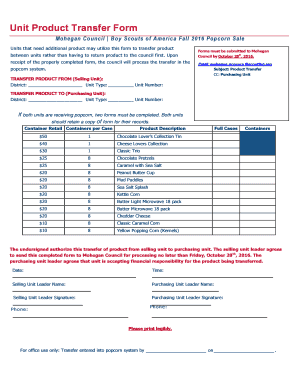
Get 2016-product-transfer-form - Mohegancouncilbsa
How it works
-

Open form follow the instructions
-

Easily sign the form with your finger
-

Send filled & signed form or save
How to fill out the 2016-Product-Transfer-Form - Mohegancouncilbsa online
The 2016-Product-Transfer-Form is essential for units looking to transfer popcorn products efficiently during the fall sale. This guide provides a comprehensive overview of how to complete this form online, ensuring a smooth process for all units involved.
Follow the steps to successfully complete the product transfer form.
- Press the ‘Get Form’ button to acquire the 2016-Product-Transfer-Form and open it for editing.
- In the ‘Transfer Product From’ section, fill in the district, unit type, and unit number for the selling unit.
- Next, move to the ‘Transfer Product To’ section and complete the district, unit type, and unit number for the purchasing unit.
- If both units are receiving popcorn, ensure that you complete a separate form for each unit.
- Populate the table with the product descriptions and the number of containers being transferred, ensuring accuracy in your entries.
- Both unit leaders must sign and print their names in the designated spaces, indicating their agreement to the terms of the transfer.
- Lastly, mark the date and time of when the form is completed and prepared for submission.
- Review all entries for accuracy, then save your changes, and if needed, download, print, or share the form as required.
Complete your product transfer form online today!
Industry-leading security and compliance
US Legal Forms protects your data by complying with industry-specific security standards.
-
In businnes since 199725+ years providing professional legal documents.
-
Accredited businessGuarantees that a business meets BBB accreditation standards in the US and Canada.
-
Secured by BraintreeValidated Level 1 PCI DSS compliant payment gateway that accepts most major credit and debit card brands from across the globe.