Loading
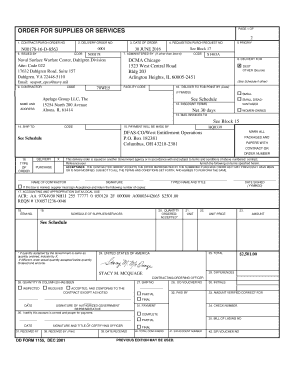
Get Contract/purch Order No
How it works
-

Open form follow the instructions
-

Easily sign the form with your finger
-

Send filled & signed form or save
How to fill out the CONTRACT/PURCH ORDER NO online
Filling out the CONTRACT/PURCH ORDER NO form is a crucial process for ensuring that supplies or services are ordered effectively. This guide provides step-by-step instructions to help users navigate the online form with ease.
Follow the steps to complete the form accurately.
- Click the ‘Get Form’ button to obtain the form and open it in your browser.
- Enter the CONTRACT/PURCH ORDER NO in the designated field at the top of the form. This is a unique identification number for your order.
- Fill in the DELIVERY ORDER NO, if applicable. This may be referenced in other sections of the form.
- Provide the DATE OF ORDER in the specified format (MM/DD/YYYY). Make sure this reflects the actual date you are filling out the form.
- Input the REQUISITION/PURCH REQUEST NO as stated in Block 17 of your documentation.
- Select the PRIORITY level for the order. You may leave this blank if it is not applicable.
- Complete the ISSUED BY section with the respective code and department validating the order.
- Fill in the ADMINISTERED BY section with the name and details of the administering entity.
- Specify the delivery location in the DELIVERY FOR section, including the address details.
- Enter the CONTRACTOR details in the corresponding fields, including the facility code and address.
- List the discount terms if applicable, e.g., 'Net 30 days'.
- Fill out the section for mailing invoices, providing necessary contact information for the recipient.
- Complete the SHIP TO and PAYMENT sections as directed, ensuring all details are correct.
- In the SIGNATURE section, the contractor must sign and print their name and title, alongside the date of signing.
- Lastly, review all entries for accuracy before saving your changes. You can download, print, or share the form as needed.
Begin filling out your CONTRACT/PURCH ORDER NO online to ensure a seamless supply or service request.
For instance, the PO number for a purchase order sent out on March 26th of 2021 would look like: PO 26032021-000001.
Industry-leading security and compliance
US Legal Forms protects your data by complying with industry-specific security standards.
-
In businnes since 199725+ years providing professional legal documents.
-
Accredited businessGuarantees that a business meets BBB accreditation standards in the US and Canada.
-
Secured by BraintreeValidated Level 1 PCI DSS compliant payment gateway that accepts most major credit and debit card brands from across the globe.