Loading
Form preview
  • US Legal Forms
  • Other Templates
  • Executive Forms
  • Executive Department DOJ Forms
  • Fbi Nics Appeal Request Form

Get Fbi Nics Appeal Request Form

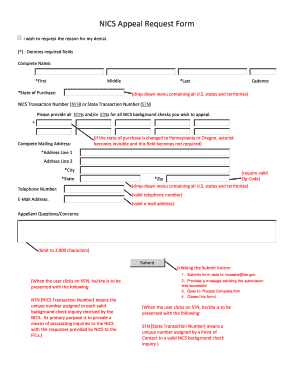
NICS Appeal Request Form I wish to request the reason for my denial. Denotes required fields Complete Name First Middle State of Purchase Last Cadence drop down menu containing all U.S. states and territories NICS Transaction Number NTN or State Transaction Number STN Please provide all NTNs and/or STNs for all NICS background checks you wish to appeal. Complete Mailing Address if the state of purchase is changed to Pennsylvania or Oregon asterisk becomes invisible and this field becomes not required Address Line 1 City State Telephone Number E Mail Address require valid Zip Zip Code valid telephone number valid e mail address Appellant Questions/Concerns limit to 2 000 characters Submit clicking the Submit button 1. Submits form data to nicsastw leo. gov When the user clicks on NTN he/she is to be presented with the following NTN NICS Transaction Number means the unique number assigned to each valid background check inquiry received by the NICS* Its primary purpose is to provide ....

How it works

  1. Open form

    Open form follow the instructions

  2. Easily sign form

    Easily sign the form with your finger

  3. Share form

    Send filled & signed form or save

How to fill out the FBI NICS Appeal Request Form online

This guide provides clear instructions on how to properly complete the FBI NICS Appeal Request Form online. By following these steps, users can effectively request the reason for their denial and ensure their appeal is submitted correctly.

Follow the steps to complete the FBI NICS Appeal Request Form online

  1. Click ‘Get Form’ button to access the appeal request form and open it in the designated interface.
  2. Enter your complete name in the appropriate fields, filling out your first name, middle name, and last name.
  3. Select your state of purchase from the drop-down menu, which contains all U.S. states and territories.
  4. Provide the NICS Transaction Number (NTN) or State Transaction Number (STN) related to your background check appeal. It is essential to include all relevant NTNs and/or STNs.
  5. Complete your mailing address. Fill out the necessary fields including Address Line 1, Address Line 2 (if applicable), city, state, and zip code. Note that if your state of purchase is changed to Pennsylvania or Oregon, this field will no longer be required.
  6. Input your valid telephone number and email address in the corresponding fields.
  7. In the Appellant Questions/Concerns section, you may describe any additional information or concerns related to your appeal. Limit your input to 2,000 characters.
  8. Once all required fields are completed, click the Submit button to send your information to the designated email address.
  9. Upon submission, you will receive a confirmation message indicating that your submission was successful, and the form will close.

Complete your FBI NICS Appeal Request Form online today for a timely response.

Get form

Experience a faster way to fill out and sign forms on the web. Access the most extensive library of templates available.
Get form

Related content

Appeals and Voluntary Appeal File
Information and frequently asked questions about the NICS appeal process and the Voluntary...
Learn more
New NICS Case: Snyder v. United States, Part I
Nov 26, 2019 — The purchase denial challenge is a classic administrative appeal, and...
Learn more
united states securities and exchange commission
Feb 28, 2020 — our public filings, including annual reports on Form 10-K, quarterly...
Learn more

Related links form

FL HSMV 82498 2011 FL HSMV 82996 2011 FL HSMV 83000 2015 FL HSMV 83016 2016

Questions & Answers

Get answers to your most pressing questions about US Legal Forms API.

Contact support

Currently, approximately 1% to 2% of NICS checks result in a denial. The reasons for denial can range from unresolved legal issues to discrepancies in personal information. Understanding these statistics can better prepare you should you encounter a denial. If you find yourself in this situation, the FBI NICS Appeal Request Form provides a pathway to challenge the decision effectively.

To appeal a NICS denial, start by obtaining a copy of your denial notice, which details the reasons for your denial. Then, fill out the FBI NICS Appeal Request Form to contest the decision. Be sure to provide any supporting documents required to clarify your eligibility. Following this process can increase your chances of a successful appeal and ensure your rights are upheld.

Obtaining a Unique Personal Identification Number (UPIN) can take several weeks, depending on the details of your background check. The FBI is responsible for issuing UPINs, and the duration may vary based on their workload and case complexity. To prevent any delays, it’s beneficial to complete the FBI NICS Appeal Request Form promptly and thoroughly.

When you submit a NICS voluntary appeal, the review process typically takes 30 to 60 days. During this period, the FBI will carefully assess your case based on the information provided. It’s essential to ensure your documentation is complete and accurate, as this can affect the review time. The FBI NICS Appeal Request Form is designed to facilitate this process efficiently.

The FBI voluntary appeal file request allows individuals to contest incorrect or incomplete information within the NICS database. By submitting this request, you can provide necessary documentation to support your case. Moreover, this process serves as a vital step toward resolving any issues related to firearms eligibility. The FBI NICS Appeal Request Form simplifies this process for you.

A typical NICS delay usually lasts up to three business days. However, some delays can extend longer based on specific circumstances surrounding the request. It's important to stay informed during this period, as a prompt resolution often depends on available information. Using the FBI NICS Appeal Request Form can provide clarity and initiate your appeal once the delay is resolved.

The processing time for a voluntary appeal file can vary. Generally, you should expect the review to take approximately 30 to 60 days. However, many factors can influence this timeframe. Utilizing the FBI NICS Appeal Request Form can help streamline your appeal and make the process smoother.

If you need to contact the FBI NICS, you can call 1-877-444-6427. This number connects you directly with representatives who can answer your questions related to background checks and the FBI NICS Appeal Request Form. It’s advisable to call during business hours for the best chance to get the assistance you need. Their support can clarify issues you may encounter during your appeal process.

To reach a NICS liaison, you can visit the official NICS website where you will find contact details and resources. NICS liaisons can assist with legal inquiries and provide guidance on submitting the FBI NICS Appeal Request Form. They are knowledgeable and ready to help you navigate the system effectively. Make sure to prepare your questions in advance for a smoother conversation.

You can contact the FBI Criminal Justice Information Services Division at 1-304-625-2000. This division handles various inquiries related to criminal justice and background checks, including NICS. If you have questions about the FBI NICS Appeal Request Form, you may find their assistance helpful for clarifying any concerns. Don't hesitate to reach out for more information.

Get This Form Now!

Use professional pre-built templates to fill in and sign documents online faster. Get access to thousands of forms.
Get form
If you believe that this page should be taken down, please follow our DMCA take down processhere.
Get FBI NICS Appeal Request Form
Get form
  • Adoption
  • Bankruptcy
  • Contractors
  • Divorce
  • Home Sales
  • Employment
  • Identity Theft
  • Incorporation
  • Landlord Tenant
  • Living Trust
  • Name Change
  • Personal Planning
  • Small Business
  • Wills & Estates
  • Packages A-Z
  • Affidavits
  • Bankruptcy
  • Bill of Sale
  • Corporate - LLC
  • Divorce
  • Employment
  • Identity Theft
  • Internet Technology
  • Landlord Tenant
  • Living Wills
  • Name Change
  • Power of Attorney
  • Real Estate
  • Small Estates
  • Wills
  • All Forms
  • Forms A-Z
  • Other Templates
  • Legal Hub
  • About Us
  • Help Portal
  • Legal Resources
  • Blog
  • Affiliates
  • Contact Us
  • Delete My Account
  • Site Map
  • Industries
  • Forms in Spanish
  • Localized Forms
  • State-specific Forms
  • Forms Kit
  • Real Estate Handbook
  • All Guides
  • Notarize
  • Incorporation services
  • For Consumers
  • For Small Business
  • For Attorneys
  • USLegal
  • FormsPass
  • pdfFiller
  • signNow
  • altaFlow
  • DocHub
  • Instapage
Form Packages
  • Adoption
  • Bankruptcy
  • Contractors
  • Divorce
  • Home Sales
  • Employment
  • Identity Theft
  • Incorporation
  • Landlord Tenant
  • Living Trust
  • Name Change
  • Personal Planning
  • Small Business
  • Wills & Estates
  • Packages A-Z
Form Categories
  • Affidavits
  • Bankruptcy
  • Bill of Sale
  • Corporate - LLC
  • Divorce
  • Employment
  • Identity Theft
  • Internet Technology
  • Landlord Tenant
  • Living Wills
  • Name Change
  • Power of Attorney
  • Real Estate
  • Small Estates
  • Wills
  • All Forms
  • Forms A-Z
  • Other Templates
Customer Service
  • Legal Hub
  • About Us
  • Help Portal
  • Legal Resources
  • Blog
  • Affiliates
  • Contact Us
  • Delete My Account
  • Site Map
  • Industries
  • Forms in Spanish
  • Localized Forms
  • State-specific Forms
  • Forms Kit
Legal Guides
  • Real Estate Handbook
  • All Guides
Prepared for you
  • Notarize
  • Incorporation services
Our Customers
  • For Consumers
  • For Small Business
  • For Attorneys
Our Sites
  • USLegal
  • FormsPass
  • pdfFiller
  • signNow
  • altaFlow
  • DocHub
  • Instapage
Social Media
Call us now toll free:
+1 833 426 79 33
As seen in:
© Copyright 1999-2026 airSlate Legal Forms, Inc. 17 Station Street, Suite 303, Brookline, MA 02445
  • Your Privacy Choices
  • Terms of Service
  • Privacy Notice
  • Content Takedown Policy
  • Bug Bounty Program