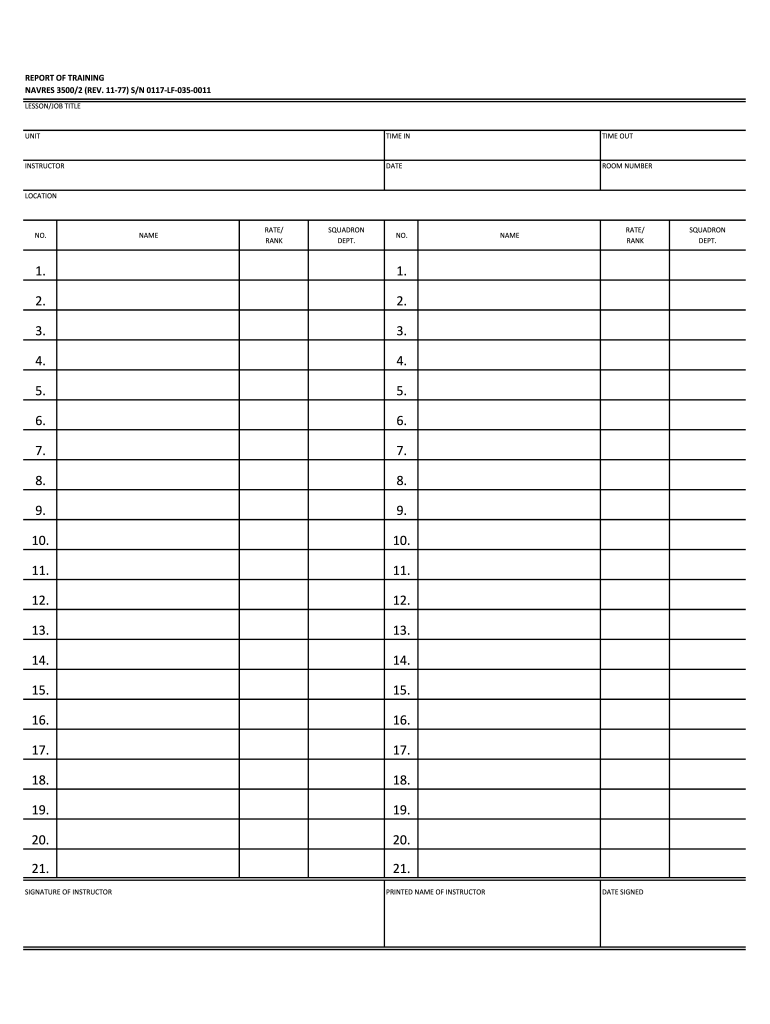
REPORT OF TRAINING NAVRES 3500/2 (REV. 1177) S/N 0117LF0350011 LESSON/JOB TITLE UNIT TIME IN TIME OUT INSTRUCTOR DATE ROOM NUMBER LOCATION NO. NAME RATE/ RANK SQUADRON DEPT. NO. 1. 2. 3. 3. 4. 4.

Open form follow the instructions

Easily sign the form with your finger

Send filled & signed form or save
How to fill out the NAVRES 3500 online
The NAVRES 3500 is a crucial form used for reporting training in various units. This guide will provide you with clear instructions on how to effectively complete the form online.
Follow the steps to accurately fill out the NAVRES 3500.
- Click ‘Get Form’ button to obtain the form and open it in the editing interface.
- Begin by entering the lesson or job title in the designated field. This should clearly describe the training being reported.
- In the 'Unit' section, input the name of the unit that conducted the training.
- Fill in the 'Time In' and 'Time Out' fields to reflect the duration of the training session.
- Provide the name of the instructor in the 'Instructor' field to ensure accountability.
- Enter the date of the training session in the specified format to maintain proper record keeping.
- Input the room number where the training took place to assist in future reference.
- In the 'Location' field, write the address or description of the training site.
- For each participant, fill in their number, name, rate or rank, and squadron department in the provided fields.
- Continue entering participant information for all attendees, as required.
- The instructor should sign in the designated area to validate the training report.
- Print the instructor's name clearly below the signature for identification.
- Re-enter the instructor's rank or rate in the provided section to maintain consistency.
- Finally, include the date when the form is signed to ensure accurate documentation.
- After completing all sections, you can save the changes made to the document.
- Download the filled-out form for your records or printing purposes.
- If necessary, share the form with relevant personnel or departments for further processing.
Complete your NAVRES 3500 form online today for streamlined reporting.
Experience a faster way to fill out and sign forms on the web. Access the most extensive library of templates available.
Related content
Jul 14, 2018 — Records are accumulated by Commandant, Naval. District Washington (NDW)...
This structure points toward a product within a technological ecosystem, potentially...
25 WATTS CW AND FR0:-1 2.8 TO 20 WA TT S MCW. AND VOICE. FREQ. RANGE 2.3 TO 9.0S HC...
Get answers to your most pressing questions about US Legal Forms API.
How to fill out leave form navy?
To fill out the leave form for the Navy, start by gathering all necessary information such as your service details, intended leave dates, and the type of leave you are requesting. It is essential to be accurate and thorough on this form to avoid delays in processing. After completing the form, you can submit it for approval through the appropriate channels outlined by your command. Using platforms like uslegalforms can simplify this process by providing templates and guidance to ensure your leave form is correctly filled out.
What is the report of training 3500?
The NAVRES 3500 report details the training activities and exercises completed by service members. It serves as a comprehensive record that helps ensure all training is documented and accounted for. This report is crucial for tracking individual progress and compliance with naval training requirements. By utilizing the NAVRES 3500 report, you can clearly see where additional training may be needed.
Can you file taxes through ADP?
Certainly, you can file taxes through ADP, making the process simpler for your business. By using ADP’s services, which align with NAVRES 3500 requirements, you gain access to professional support and tools designed for this purpose. From calculating your payroll to filing your tax returns, ADP manages the complexities efficiently. This option can save you time and increase accuracy in your tax handling.
Does ADP file Form 941?
Yes, ADP does file Form 941, which is the employer's quarterly federal tax return. Utilizing ADP allows businesses to automate the filing process, ensuring timely submissions under the NAVRES 3500 criteria. This solution helps you stay compliant while reducing the administrative burden on your team. Trust ADP to streamline your tax filing needs efficiently.
How to file Form 8974 with ADP?
To file Form 8974 with ADP, start by ensuring you have the necessary information such as your business details and the credits you are claiming. Then, consult the ADP platform for the forms and instructions specific to NAVRES 3500. Follow the guidelines provided by ADP to complete and submit Form 8974. Remember, ADP can offer support throughout the filing process to ensure accuracy.
Who can file Form 8974?
Generally, any eligible business that intends to claim the Employee Retention Credit can file Form 8974. These businesses typically include employers who retained employees during the significant disruptions caused by the pandemic. If you qualify under the NAVRES 3500 guidelines, you can use this form to apply for your credits. Always consult a tax professional to verify your eligibility.
Use professional pre-built templates to fill in and sign documents online faster. Get access to thousands of forms.
If you believe that this page should be taken down, please follow our DMCA take down process here.