Loading
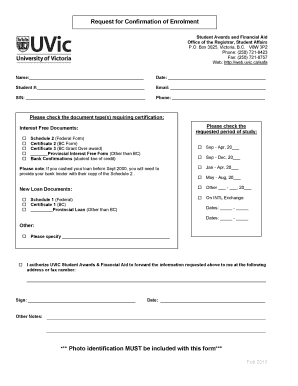
Get Request For Confirmation Of Enrolment - Web.uvic.ca - Web Uvic
How it works
-

Open form follow the instructions
-

Easily sign the form with your finger
-

Send filled & signed form or save
How to fill out the Request For Confirmation Of Enrolment - Web.uvic.ca - Web Uvic online
This guide provides a clear and concise overview of how to complete the Request For Confirmation Of Enrolment form online. Follow the steps outlined to ensure your submission is accurate and complete.
Follow the steps to successfully fill out the form.
- Click ‘Get Form’ button to access the form and open it in your preferred document editor.
- Begin by entering your name in the designated field. Ensure that your name is spelled correctly as it appears on your official identification.
- Input the date on which you are filling out the form in the provided space. This date will help in tracking your request.
- Enter your student number in the specified field. This unique number is crucial for identifying your academic records.
- Provide your email address. This is important for communication regarding your request.
- Fill in your Social Insurance Number (SIN) in the appropriate section. This information may be required for financial documentation.
- Input your phone number in the designated field to enable the office to contact you if needed.
- Select the document types that need certification by checking the relevant boxes. Common options include interest-free documents and new loan documents.
- Indicate the requested period of study by checking the appropriate box(es) and filling in the years as needed for your enrollment period.
- Provide additional details in the 'Other' section if necessary. This could include specifications for document types not listed.
- In the authorization section, ensure to provide the address or fax number where you'd like to receive the requested information.
- Sign the form in the designated area. Your signature is necessary for the approval process.
- Note that photo identification must accompany this form when submitted. Prepare to upload or include a digital copy.
- Once you have completed the form, review all entries for accuracy before saving, downloading, printing, or sharing the document as needed.
Complete your form submission online to ensure your enrollment confirmation is processed efficiently.
Contact the Office of the Registrar Group/PositionTelephoneOffice of the RegistrarGeneral Inquiries250-721-8121UVic Transcripts250-721-8121FAX250-721-622554 more rows