Loading
Get Hais Common Teacher Recommendation
How it works
-

Open form follow the instructions
-

Easily sign the form with your finger
-

Send filled & signed form or save
How to fill out the Hais Common Teacher Recommendation online
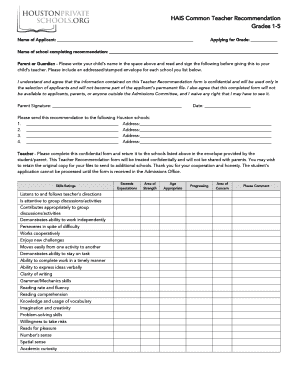
The Hais Common Teacher Recommendation is an essential document that aids in the application process for students seeking admission to grades 1-5. This guide provides a detailed, step-by-step approach to fill out the form accurately and effectively.
Follow the steps to complete the Hais Common Teacher Recommendation form.
- Click ‘Get Form’ button to obtain the form and open it in the editor.
- Begin by entering the name of the applicant in the designated space at the top of the form. Ensure that it is spelled correctly.
- Fill in the name of the school that is completing the recommendation on the corresponding line. This helps identify the context of the recommendation.
- The parent or guardian should read the confidentiality statement carefully and sign the form, along with providing the date of signing in the indicated spaces.
- List the schools where the recommendation should be sent. Fill in the school names and addresses as requested. Remember to include an addressed and stamped envelope for each listed school.
- The teacher needs to complete the skills ratings section by assessing the applicant across various competencies, using the rating scale provided.
- In the social skills section, the teacher should select the appropriate frequency for each statement related to the applicant’s social behavior.
- Provide descriptive comments regarding the student’s strengths, challenges, and any additional relevant information in the designated comment areas.
- Conclude by selecting the recommendation level and signing the form. The teacher should also fill in their name, school address, email, and phone number for verification.
- After all sections are completed, the teacher should ensure that the form is returned to the listed schools in the envelope provided by the student/parent.
Complete the Hais Common Teacher Recommendation online today to support the student's application process.
Aug 12, 2022•Knowledge Go to the Recommenders and FERPA section of a school in the My Colleges tab. Scroll down until you see the "Teacher" or "Other Recommender" section. Click on the box to select the Teacher or Other Recommender you want to assign. ... Click on the "Assign" button to assign that recommender.