Loading
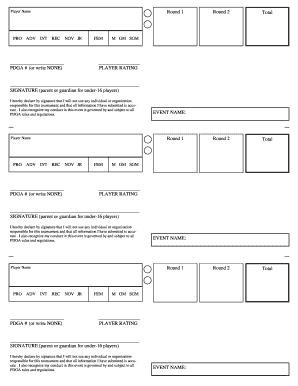
Get Scorepointe Player Cards Waiver.pub
How it works
-

Open form follow the instructions
-

Easily sign the form with your finger
-

Send filled & signed form or save
How to fill out the Scorepointe Player Cards Waiver.pub online
Filling out the Scorepointe Player Cards Waiver.pub is an essential step for participants in disc golf tournaments. This guide will provide you with clear, step-by-step instructions to navigate the online form with ease, ensuring that you complete it efficiently and accurately.
Follow the steps to fill out your player cards waiver smoothly.
- Click the ‘Get Form’ button to acquire the form and open it in your preferred online editor.
- Enter the player's name in the designated field to identify who the waiver applies to.
- Select the player's division by checking the appropriate box for PRO, ADV, INT, REC, NOV, or JR.
- If applicable, input the PDGA number in the provided space or indicate 'NONE' if the player does not have one.
- Fill in the event name that corresponds to the tournament during which this waiver is being submitted.
- Complete the round information fields, documenting scores for each round as instructed.
- At the end of the form, ensure the correct player rating is entered in the designated area.
- The form requires a signature from the parent or guardian if the player is under 16 years old. Make sure this is included.
- Review all entered information for accuracy before finalizing the form.
- Once completed, save changes, download or print the form as needed, or share it if required.
Ensure your participation by completing and submitting your Scorepointe Player Cards Waiver.pub online today.