Loading
Get Hospital Incident Management Team
How it works
-

Open form follow the instructions
-

Easily sign the form with your finger
-

Send filled & signed form or save
How to fill out the Hospital Incident Management Team online
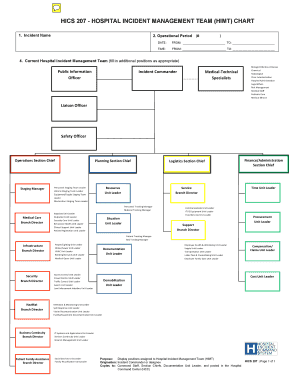
Filling out the Hospital Incident Management Team (HIMT) chart is an essential step in effectively managing healthcare incidents. This guide will walk you through the process of completing this form online, ensuring you understand each component clearly.
Follow the steps to complete the form accurately.
- Press the ‘Get Form’ button to access the Hospital Incident Management Team chart and open it for editing.
- In the 'Incident Name' field, enter the designated name assigned to the incident, ensuring it is clear and concise.
- Fill out the 'Operational Period' section. Enter the start date and time using the 24-hour clock format, followed by the end date and time.
- In the 'Current Hospital Incident Management Team' section, input the names of personnel assigned to each HIMT role. Remember to adjust the chart to include any additional positions as necessary.
- If required, add extra lines or spaces for Command Staff assistants and agency representatives to ensure all relevant team members are included.
- After completing the form, you can choose to save your changes, download the completed chart, print it for distribution, or share it with relevant parties as needed.
Start completing the Hospital Incident Management Team chart online to streamline your incident response process.
Related links form
An incident management team is dispatched or mobilized during complex emergency incidents to provide a command and control infrastructure in order to manage the operational, logistical, informational, planning, fiscal, community, political, and safety issues associated with complex incidents.