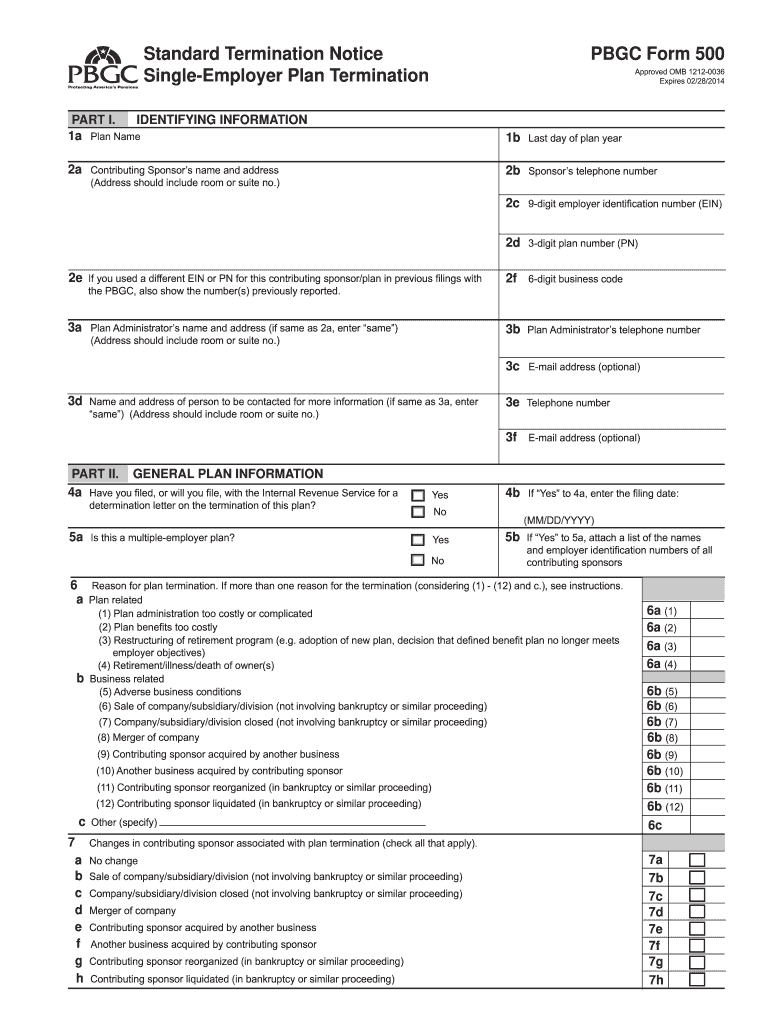
% % % % 9a 9b 9c 9d 9e 9f 9g 9h Yes defined benefit plan be substantially the same as under the terminating plan for all affected participants (currently employed participants that you expect will be covered under the new or existing defined benefit plan.) No (MM/DD/YYYY) 11a Proposed termination date 11b 12a Earliest date notices of intent to terminate issued to affected parties 12b Latest date notices of intent to terminate issued to affected parties (MM/DD/YYYY) 13 Latest da.
Loading

Open form follow the instructions

Easily sign the form with your finger

Send filled & signed form or save
How to fill out the PBGC 500 & 501 online
Filling out the PBGC 500 and 501 forms can seem daunting, but with a clear understanding of each component, the process can be straightforward. This guide will provide you with step-by-step instructions to complete these forms online with confidence.
Follow the steps to efficiently complete your PBGC 500 & 501 forms.
- Click ‘Get Form’ button to obtain the form and open it in your preferred editing tool.
- Begin with Part I: Enter the identifying information. Input the plan administrator's name and address in section 1a, as well as additional contact details as necessary.
- Move to Part II: General plan information. Answer the questions regarding the determination letter filings and whether this plan is a multiple-employer plan. Provide the necessary business code and contact information.
- In this section, indicate the reason for the plan termination by selecting from the listed options. Ensure you check all applicable reasons.
- Provide data on the number of active participants, retirees, and separated vested participants in Part II, section 9. Make sure the totals reflect the correct counts.
- Continue to Part III: Residual plan assets. If applicable, indicate whether residual assets will be returned to the employer and note the estimated amounts.
- In Part IV: Certification, the plan administrator must sign and date the form, confirming that all information is accurate and true.
- Lastly, review the completed forms, save your changes, and consider options to download, print, or share the forms as needed.
Complete your PBGC 500 & 501 forms online today to ensure compliance and timely submission.
Experience a faster way to fill out and sign forms on the web. Access the most extensive library of templates available.
Related content
You may file PBGC Form 500 (including Schedules EA-S and REP-S) and Form 501 by hand...
The plan administrator shall file with the PBGC a standard termination notice, consisting...
No later than the time Form 500. (Standard Termination Notice) is filed with PBGC. Form...
Get answers to your most pressing questions about US Legal Forms API.
Who becomes 100% vested in a plan termination?
In a plan termination, participants typically become 100% vested in their accrued benefits. This means that all contributions made to the pension plan on their behalf become theirs, regardless of their length of service. PBGC 500 & 501 stipulates that this process is designed to protect employees during the termination. If you have questions about your specific situation, reaching out to uslegalforms can provide clarity and assistance.
Is PBGC pension taxable income?
Yes, PBGC pensions are considered taxable income. When you start receiving benefits from PBGC 500 & 501, the IRS will require you to report this income on your tax returns. It’s essential to keep this in mind when planning your finances for retirement. Consider consulting a tax professional to understand how this income impacts your overall tax situation.
What is the pension 6 rule?
The pension 6 rule pertains to specific guidelines set by the PBGC regarding the funding and termination of pension plans. This rule impacts how benefits are managed in situations involving underfunded plans. Understanding this rule is vital for companies to navigate their obligations effectively. Stay informed about these guidelines to ensure compliance and protect your benefits.
How does a company terminate a pension plan?
To terminate a pension plan, a company must first ensure it is either fully funded or meets the requirements for another termination method. They then follow PBGC 500 & 501 guidelines, which include sending notifications to participants and filing official paperwork. The company's compliance with these regulations is crucial for a smooth termination process. Ultimately, this enables participants to receive their benefits promptly.
What is a standard termination?
A standard termination occurs when a pension plan is fully funded and the plan sponsor decides to end the plan. This process ensures that all participants receive their vested benefits. To execute a standard termination, the sponsor must comply with PBGC 500 & 501 requirements, ensuring that they notify all plan participants properly. This termination method often allows for a smoother transition for both the company and its employees.
How do I apply for PBGC?
Applying for PBGC benefits is a straightforward process. You need to fill out the necessary forms to initiate your application under PBGC 500 & 501. It's essential to gather all relevant documents, such as your employment history and pension information, before beginning. Once you submit your application, PBGC will review it and communicate any additional requirements.
How does PBGC calculate benefits?
The PBGC calculates benefits based on several factors, including your years of service and the level of funding in your pension plan. Typically, they use a formula that considers your average salary and years of participation in the plan. It is essential to understand these calculations as they directly impact your expected PBGC 500 & 501 benefits.
How do I claim my pension amount?
Claiming your PBGC pension amount involves contacting the PBGC to determine your benefit options. After verifying your eligibility, you may need to complete additional paperwork to specify how you would like to receive your payments. Utilizing resources from uslegalforms can streamline this process and provide you with the steps necessary to claim your PBGC 500 & 501 benefits.
How do I claim my PBGC pension?
To claim your PBGC pension, you will need to submit a claim form to the PBGC along with any required documentation. It’s important to prepare your personal information, including your plan details and employment history. For assistance, uslegalforms can help you find the right resources and templates needed to complete your claim efficiently.
How do I retrieve my pension?
Retrieving your PBGC pension requires a few essential steps. First, visit the PBGC website or contact their office for guidance based on your specific plan. They will assist you in accessing your account and retrieving information about your PBGC 500 & 501 pension benefits.
Use professional pre-built templates to fill in and sign documents online faster. Get access to thousands of forms.
If you believe that this page should be taken down, please follow our DMCA take down process here.
This form is available in several versions. Select the version you need from the drop-down list below.