Loading
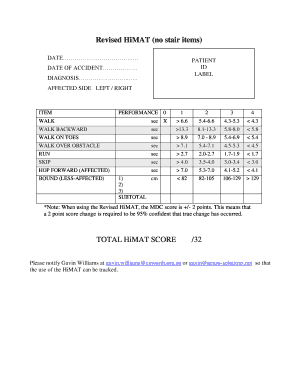
Get Revised Himat (no Stair Items)
How it works
-

Open form follow the instructions
-

Easily sign the form with your finger
-

Send filled & signed form or save
How to fill out the Revised HiMAT (no Stair Items) online
Filling out the Revised HiMAT (no Stair Items) online can be accomplished through a straightforward process. This guide provides clear, step-by-step instructions to ensure a smooth completion of the form.
Follow the steps to correctly fill out the Revised HiMAT (no Stair Items) online.
- Click ‘Get Form’ button to access the Revised HiMAT (no Stair Items). This action will open the document in an online editor for input.
- Enter the date in the designated field at the top of the form. This date should reflect the current date or the relevant date for the assessment.
- Fill in the patient ID label with the appropriate identification number for the individual undergoing the assessment.
- Input the date of accident in the specified area, ensuring the format matches any requirements indicated on the form.
- Complete the diagnosis field with the relevant medical diagnosis, ensuring accuracy for assessment purposes.
- Indicate the affected side by selecting either 'Left' or 'Right' in the corresponding section.
- For each item listed in the performance section, record the time or distance measurements according to the provided testing instructions. Ensure to follow the specific protocols for each physical assessment, such as walking or hopping.
- Calculate the subtotal for each performance item by adding up the scores based on the recorded times or distances, as directed.
- Once all items are filled out and subtotals calculated, compute the total HiMAT score and enter it in the provided space.
- Review all entries for completeness and accuracy before proceeding to save your changes, download the document, print it, or share it as needed.
Start filling out the Revised HiMAT (no Stair Items) online to complete your assessment efficiently.
The HiMAT is designed to assesses patients who suffer from high-level balance and mobility problems. Minimum mobility requirement is independent walking over 20 meters without gait aids (orthoses are permitted). Patients are allowed a trial session prior to the scored assessment.