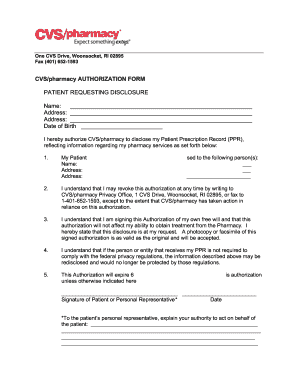
________________________________________________ Address: ________________________________________________________ Date of Birth _________________________ I hereby authorize CVS/pharmacy to disclose my Patient Prescription Record (PPR), reflecting information regarding my pharmacy services as set forth below: 1. My Patient Name: Address: Address: sed to the following person(s): ___ ___ ______________________ 2. I understand that I may revoke this authorization at any time by writing to CVS/p.

How it works
  • Open form

    Open form follow the instructions

  • Easily sign form

    Easily sign the form with your finger

  • Share form

    Send filled & signed form or save

How to fill out the CVS/pharmacy Patient Authorization Form online

Filling out the CVS/pharmacy Patient Authorization Form online can be straightforward when you understand each section and its requirements. This guide will take you through the necessary steps to ensure your form is completed accurately and efficiently.

Follow the steps to complete the form with ease.

  1. Click 'Get Form' button to obtain the form and open it in an editable format.
  2. Begin by entering your name in the designated field at the top of the form. Make sure to use your legal name as it appears on your identification.
  3. Fill in your complete address, including street, city, state, and zip code, in the address fields provided.
  4. Provide your date of birth in the specified section to help verify your identity.
  5. Authorize the disclosure of your Patient Prescription Record (PPR) by completing the section that specifies who will receive your information. Include the names and addresses of the person or organization you are authorizing.
  6. Read the terms regarding revocation of the authorization and your rights outlined in the form to ensure you fully understand your consent.
  7. Sign the form in the designated signature area, confirming that you are giving this authorization voluntarily.
  8. If you are completing this form on behalf of someone else, provide your relationship to the patient and explain your authority to act as their representative in the specified section.
  9. Include the date you are signing the form to validate your authorization.
  10. Once you have completed all sections, save the changes, and choose to download, print, or share the form as needed.

Complete your CVS/pharmacy Patient Authorization Form online today for a hassle-free experience.

Get form

Experience a faster way to fill out and sign forms on the web. Access the most extensive library of templates available.

Related content

Formulary Exception/Prior Authorization Request...

I attest that the medication requested is medically necessary for this patient. I further...

Learn more
CVS Caremark Home

We're CVS Caremark, and we manage your prescription plan. That means we make sure you have...

Learn more
2021 Medication Access Report

Jan 26, 2021 — Solutions such as real-time prescription benefit (RTPB), electronic prior...

Learn more
Questions & Answers

Get answers to your most pressing questions about US Legal Forms API.

Contact support

How long does CVS keep prescription history?

The length of time before returning a prescription to stock varies but generally, 2 weeks is the average time it will sit in pickup before returning to the shelf. Extremely expensive or special order meds maybe in a week.

You can sign in anytime on your computer or mobile device to check your order status online. You'll be able to see when your refill is processing, has shipped and has been delivered.

An authorization form can be used by a patient or his/her authorized legal representative to authorize a healthcare provider to obtain the patient's records from another provider. It may be used by providers participating in health information exchanges as applicable.

More information... Once you Add Prescription Management, you can view and print your prescription records at any time. Just sign in to your account and click on Pharmacy. From the Pharmacy page, click on Prescription Center and then select the Prescription History tab.

The CVS/caremark Mail Service provides compounding services for many Medications; however, CVS/caremark does not compound some Medications. These compounds must be obtained through a Participating Retail Pharmacy or another compounding pharmacy.

As part of the participation in such programs, the member is usually asked to sign an authorization form that would allow specialty pharmacies to release protected health information (PHI) and other data to the pharma manufacturers to assist these programs.

CVS Health includes the company's retail business, which continues to be called CVS/pharmacy; its pharmacy benefit management business, which is known as CVS/caremark; its walk-in medical clinics, CVS/minuteclinic; and its growing specialty pharmacy services, CVS/specialty.

The Health Insurance Portability and Accountability Act of 1996 was put in place to help ensure the privacy and ease of access of your medical records. A HIPAA authorization form is a document in that allows an appointed person or party to share specific health information with another person or group.

Pharmacies and doctors are legally bound to safeguard your prescription records and not give them to, say, an employer. (Learn more about the laws that protect your privacy.) But your records can still be shared and used in ways you might not expect, by: Pharmacy chains and their business partners.

Get This Form Now!

Use professional pre-built templates to fill in and sign documents online faster. Get access to thousands of forms.

If you believe that this page should be taken down, please follow our DMCA take down process here.

Get CVS/pharmacy Patient Authorization Form