Get Hesi Transcript Request Form 2014-2026
How it works
-

Open form follow the instructions
-

Easily sign the form with your finger
-

Send filled & signed form or save
How to fill out the HESI Transcript Request Form online
Filling out the HESI Transcript Request Form online is a straightforward process that ensures your academic records are efficiently submitted to the appropriate institutions. This guide will provide clear steps to navigate through each section of the form with ease.
Follow the steps to complete your transcript request form accurately.
- Press the ‘Get Form’ button to access the HESI Transcript Request Form. This action will open the document for you to complete online.
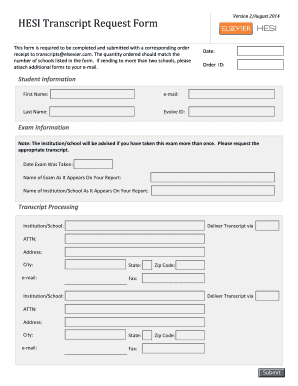
- Fill in the date and your unique order ID at the top of the form. This information helps to track your request.
- In the Student Information section, enter your first name, last name, email address, and Evolve ID. Ensure that all details are correct to avoid processing delays.
- In the Exam Information section, provide the date the exam was taken, the name of the exam as it appears on your report, and the name of the institution or school as listed on your report.
- In the Transcript Processing section, list the institutions or schools that should receive your transcript. Include the delivery method—whether by mail, email, or fax—and provide the appropriate attention name, address, city, state, zip code, and email or fax details for each institution.
- If you are requesting transcripts for more than two schools, attach additional forms as required and ensure that the quantity of transcripts requested matches the number of schools listed.
- Review all the information entered to ensure accuracy and completeness. This is crucial to prevent any issues with your request.
- Once all sections are filled out and reviewed, you can save your changes and proceed to download, print, or share the completed form as instructed in your submission guidelines.
Start filling out your HESI Transcript Request Form online today to ensure timely processing of your academic records.
To send your HESI A2 score, you will need to complete the HESI Transcript Request Form and provide the details of the institution or program where you want to send your scores. After submitting the form, your scores will be officially transmitted to the specified location. Be sure to check for any additional requirements imposed by the receiving institution to ensure a smooth process.