Loading
Get Ers 100//1/ - Retirement Systems Of Alabama - Rsa-al
How it works
-

Open form follow the instructions
-

Easily sign the form with your finger
-

Send filled & signed form or save
How to fill out the ERS 100//1/ - Retirement Systems Of Alabama - Rsa-al online
Filling out the ERS 100//1/ form for the Retirement Systems of Alabama is an important step for individuals seeking to enroll in the retirement system. This guide will provide clear and supportive instructions to ensure that users can complete the form accurately and efficiently.
Follow the steps to fill out the ERS 100//1/ effectively.
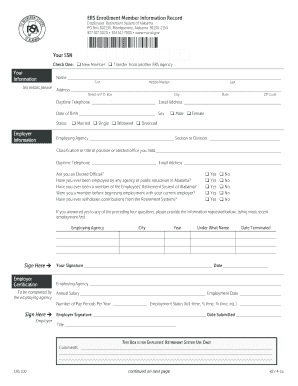
- Click ‘Get Form’ button to obtain the form and open it in the editor.
- Begin by checking the appropriate box to indicate whether you are a new member or transferring from another ERS agency.
- In the 'Your Information' section, provide your full name without initials, your complete address, daytime telephone number, email address, date of birth, and gender status.
- Complete the 'Employer Information' section by filling in your employing agency name, position classification, and any additional details regarding your employment status.
- Answer the questions regarding previous employment with public education agencies in Alabama, past membership in the system, and any withdrawals from the retirement system by selecting 'Yes' or 'No' as applicable.
- If you answered 'Yes' to any of the previous questions, list your most recent employment details, including agency name, city, year, name under which you were employed, and termination date.
- Provide your signature and the date to confirm the accuracy of your information.
- Have your employer complete the certification section, including the employer’s signature and the date submitted.
- Designate your primary and contingent beneficiaries by providing their names, relationships, dates of birth, and addresses.
- Sign the agreement regarding beneficiary payments and have your signature acknowledged before a Notary Public.
- Review all entered information for accuracy before submitting. Users can then save changes, download, print, or share the completed form.
Begin filling out your ERS 100//1/ form online to secure your retirement benefits.
Contributions towards your pension are taken out of your salary by your employer every month. In addition to this, the employer makes a contribution towards the pension. The two contributions are jointly paid to the Pension Fund Custodian who puts the funds into an account which is held in your name with your PFA.
Industry-leading security and compliance
US Legal Forms protects your data by complying with industry-specific security standards.
-
In businnes since 199725+ years providing professional legal documents.
-
Accredited businessGuarantees that a business meets BBB accreditation standards in the US and Canada.
-
Secured by BraintreeValidated Level 1 PCI DSS compliant payment gateway that accepts most major credit and debit card brands from across the globe.