Loading
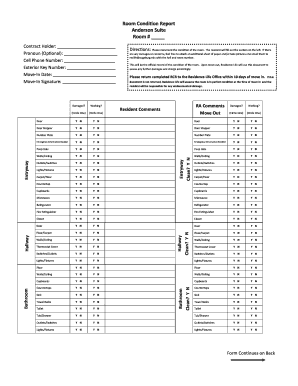
Get Room Condition Report Anderson Suite Room #
How it works
-

Open form follow the instructions
-

Easily sign the form with your finger
-

Send filled & signed form or save
How to fill out the Room Condition Report Anderson Suite Room # online
The Room Condition Report for the Anderson Suite Room # is an important document that allows residents to formally record the condition of their living space upon moving in. This guide provides clear instructions to assist users in accurately completing the report online.
Follow the steps to effectively fill out the Room Condition Report online.
- Click ‘Get Form’ button to obtain the Room Condition Report and open it in your chosen editor. This will enable you to access the online document for completion.
- Begin by filling out the room number field at the top of the form. Ensure the number entered corresponds with the room you will be residing in.
- Carefully examine each item listed in the report. For each item, determine its condition and circle ‘Y’ for yes or ‘N’ for no to indicate if it is damaged or in working order.
- For any items that are damaged, you may want to attach an additional sheet of paper if you require more space to document the condition further or make additional comments.
- Include any comments you would like to make regarding the condition of the room in the designated Resident Comments section.
- Ensure your contact information is filled out accurately, including your name, optional pronoun, cell phone number, exterior key number, and move-in date.
- Finally, review the entire form for completeness. Once satisfied, save your changes, and then you can either download, print, or share the completed form as needed.
Complete your Room Condition Report online today to ensure accurate documentation of your living space.