Loading
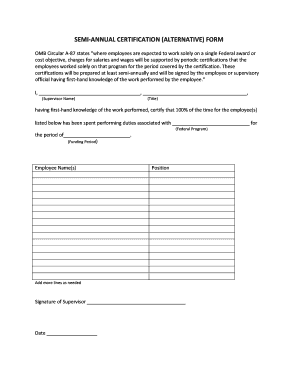
Get Semi-annual Certification (alternative) Form - Dese Mo
How it works
-

Open form follow the instructions
-

Easily sign the form with your finger
-

Send filled & signed form or save
How to fill out the SEMI-ANNUAL CERTIFICATION (ALTERNATIVE) FORM - Dese Mo online
Completing the SEMI-ANNUAL CERTIFICATION (ALTERNATIVE) FORM - Dese Mo online is a crucial process for ensuring compliance with federal requirements. This guide will provide you with clear, step-by-step instructions to help you easily fill out the form without confusion.
Follow the steps to complete the form online effectively.
- Press the ‘Get Form’ button to access the SEMI-ANNUAL CERTIFICATION (ALTERNATIVE) FORM - Dese Mo and open it in the available editor.
- In the first blank field, enter the name of the supervising individual who has first-hand knowledge of the employee’s work.
- In the second blank field, fill in the title of the supervisor you just named.
- In the text area, write the specific federal program associated with the employee's duties.
- Specify the time period covered by the certification in the relevant funding period field.
- List the names and positions of the employees who have performed duties under the specified federal program. If needed, add more lines to accommodate additional employees.
- Ensure the supervisor signs the form in the designated signature section.
- Finally, enter the date when the form is signed. Users can now save changes, download the completed form, print it for physical records, or share it as required.
Complete your SEMI-ANNUAL CERTIFICATION (ALTERNATIVE) FORM - Dese Mo online to ensure compliance.
Contact us at communications@dese.mo.gov or by calling 573-751-4212.