Loading
Get Vampire Character Sheet
How it works
-

Open form follow the instructions
-

Easily sign the form with your finger
-

Send filled & signed form or save
How to fill out the Vampire Character Sheet online
This guide offers a clear and comprehensive approach to completing the Vampire Character Sheet online. Whether you are a beginner or familiar with character sheets, these instructions will help you navigate each section with ease.
Follow the steps to successfully complete your Vampire Character Sheet.
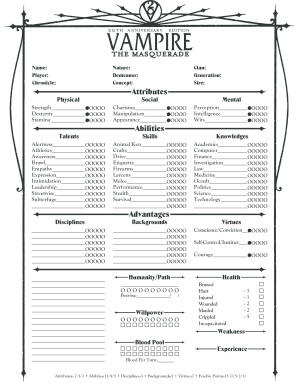
- To start, click the ‘Get Form’ button to access the Vampire Character Sheet and open it in your online editor.
- Begin filling out the 'Name', 'Player', and 'Chronicle' fields at the top of the sheet. These fields help identify your character and the game context.
- Next, define the 'Nature', 'Demeanor', and 'Concept' of your character. These elements reflect the personality and background of your vampire.
- Proceed to the 'Attributes' section and allocate points to 'Physical', 'Social', and 'Mental' attributes. Distribute the points according to your character’s strengths and weaknesses.
- In the 'Talents' section, fill out your character's skills in various areas such as 'Alertness', 'Brawl', and 'Leadership' by marking the appropriate levels.
- Move to the 'Disciplines' section, where you can note any supernatural abilities your character possesses.
- Continue to the 'Advantages' and 'Humanity/Path' sections. List your character's backgrounds, virtues, and current state of humanity or path.
- As you arrive at the 'Health' section, track your character’s physical condition using the provided categories.
- Fill out the 'Experience' and 'Derangements' sections, keeping track of your character's growth and any psychological challenges.
- For 'Combat', note down any weapons and attacks your character may use, along with relevant statistics like damage and range.
- Finally, once you have completed all sections, you can choose to save your changes, download the filled-out character sheet, print it, or share it as needed.
Start filling out your Vampire Character Sheet online today to bring your character to life!
When filling out a Roll20 character sheet, begin by selecting your character’s type, race, and class. Enter your attributes and skills as guided by the platform's interface. Roll20 supports various systems, and you can enhance your experience with a Vampire Character Sheet to ensure you have all relevant information displayed clearly. This efficient setup helps you focus on gameplay and enjoy your character's journey.