Loading
Get Online Forms From United States
How it works
-

Open form follow the instructions
-

Easily sign the form with your finger
-

Send filled & signed form or save
How to fill out the Online Forms From United States online
Filling out online forms can be a straightforward process when you have clear instructions. This guide will help you navigate the Online Forms From United States, ensuring you provide the necessary information accurately and efficiently.
Follow the steps to successfully complete the online form.
- Click ‘Get Form’ button to obtain the form and open it in the editor.
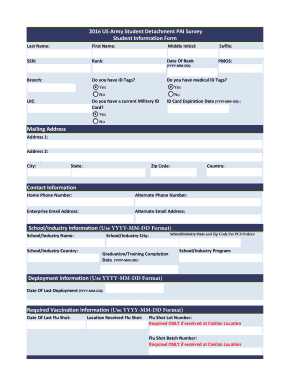
- Begin by entering your last name, first name, middle initial, and suffix as required. Ensure that the spelling is correct and in the appropriate fields.
- Provide your social security number (SSN) and your date of rank in the specified YYYY-MM-DD format.
- Indicate your rank, primary military occupational specialty (PMOS), and branch of service.
- Respond to the questions regarding ID tags and military ID cards by selecting either 'Yes' or 'No'.
- Fill in your unit identification code (UIC) and medical ID tag information as applicable.
- Complete your mailing address, including address lines, city, state, zip code, and country.
- Input your contact information, including home and alternate phone numbers, as well as your email addresses.
- Provide details related to your school or industry, such as the name and location, following the required format.
- Enter your graduation or training completion date and indicate the program you were enrolled in.
- For deployment information, fill in the date of your last deployment in the required format.
- Complete the vaccination information by entering the date and location of your last flu shot, including any lot or batch numbers required.
- Indicate whether you have a current physical profile and specify if it is temporary or permanent. Provide expiration dates if applicable.
- Attach any necessary documents related to your current physical profile as requested.
- Fill out the last APFT date and score, and provide height and weight information, specifying if you passed or failed the test.
- Review all the information you have entered to ensure accuracy and completeness.
- Once you are satisfied with the information, you can save your changes, download, print, or share the form as needed.
Start completing your documents online to streamline your submission process today.
You generally have two options for filing your Form N-400 with USCIS: Online; or. By mail (paper).