Loading
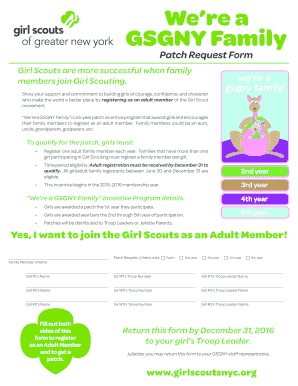
Get Gsgny
How it works
-

Open form follow the instructions
-

Easily sign the form with your finger
-

Send filled & signed form or save
How to fill out the Gsgny online
Filling out the Gsgny Family Patch Request Form is straightforward and essential for supporting your Girl Scout. This guide will walk you through each section of the form step-by-step, ensuring you complete it accurately and efficiently.
Follow the steps to successfully complete the Gsgny form.
- Use the ‘Get Form’ button to obtain the Gsgny Family Patch Request Form and open it in your preferred editor.
- Begin by filling in the family member’s name who is registering as an adult member. This is crucial for identifying who will receive the patch.
- Indicate the patch request by checking the appropriate box for the year of participation: 1st year, 2nd year, 3rd year, 4th year, or 5th year.
- Continue by providing names, troop numbers, and troop leader names for up to three Girl Scouts. Ensure the details are accurate to streamline the process.
- Complete the contact information section, including title, first name, middle name, last name, address, city, state, zip code, and phone numbers. Fill in the email address as well, as it is required.
- In the demographics section, select the appropriate gender and fill in your date of birth. Additionally, mark the number of years you have been associated with Girl Scouts.
- Specify your role in Girl Scouting by marking all applicable boxes (e.g., volunteer, parent/family, Girl Scout alumnae). This helps in understanding your involvement.
- Read and accept the Girl Scout Promise and Law by signing and dating the form at the end.
- Finally, review the payment options for membership and any donations. Check the appropriate boxes and fill in the necessary payment details.
- Once the form is fully completed, save your changes. You can download, print, or share the form with the appropriate troop leader by the deadline.
Complete your Gsgny Family Patch Request Form online today to support Girl Scouts and help empower the next generation!
STUDIO 2B was discontinued as a program option in 2007. Daisies (5-6 years old or in kindergarten) Brownies (6–8 years old or in grades 1–3) Juniors (8–12 years old or in grades 4–6. ... Cadettes (12–14 years old or in grades 7–9. ... Seniors (14–17 years old or in grades 9–12)
Industry-leading security and compliance
US Legal Forms protects your data by complying with industry-specific security standards.
-
In businnes since 199725+ years providing professional legal documents.
-
Accredited businessGuarantees that a business meets BBB accreditation standards in the US and Canada.
-
Secured by BraintreeValidated Level 1 PCI DSS compliant payment gateway that accepts most major credit and debit card brands from across the globe.