Loading
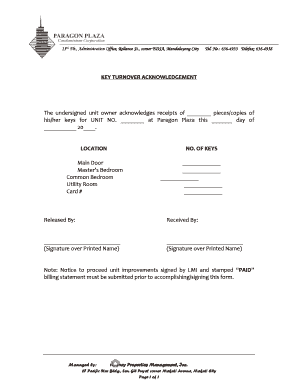
Get Key Turnover
How it works
-

Open form follow the instructions
-

Easily sign the form with your finger
-

Send filled & signed form or save
How to fill out the Key Turnover online
Filling out the Key Turnover form is an important step in the process of officially acknowledging the receipt of keys for your unit. This guide will provide you with clear and straightforward instructions to help you complete the form accurately.
Follow the steps to complete the Key Turnover form successfully.
- Press the ‘Get Form’ button to access the Key Turnover form and open it in your preferred editor.
- In the first section, enter the number of keys you are receiving. This should include each type of key being acknowledged, such as for the main door, bedrooms, and utility room.
- In the ‘Unit No.’ field, input your unit number to associate the keys with the correct property.
- Fill in the date on which you are receiving the keys. Make sure to enter this accurately as it records the official turnover date.
- In the ‘Location’ section, indicate the quantity of keys for each category listed, such as the main door, master’s bedroom, common bedroom, and utility room. Provide the exact number of keys received for each.
- Include the card number, if applicable, by filling in the appropriate field.
- In the ‘Released By’ section, the individual or entity releasing the keys should provide their signature and printed name.
- In the ‘Received By’ section, as the owner, sign and print your name to confirm receipt of the keys.
- Review all entries for accuracy to ensure all required information is complete before finalizing the form.
- Once you are satisfied with the information, save the changes. You may also download, print, or share the completed form as needed.
Complete your documents online with confidence and efficiency.
Industry-leading security and compliance
US Legal Forms protects your data by complying with industry-specific security standards.
-
In businnes since 199725+ years providing professional legal documents.
-
Accredited businessGuarantees that a business meets BBB accreditation standards in the US and Canada.
-
Secured by BraintreeValidated Level 1 PCI DSS compliant payment gateway that accepts most major credit and debit card brands from across the globe.