Loading
Get Eagles Nest Charter Academy Enrollment Application - Eaglesnestschools
How it works
-

Open form follow the instructions
-

Easily sign the form with your finger
-

Send filled & signed form or save
How to fill out the EAGLES NEST CHARTER ACADEMY ENROLLMENT APPLICATION - Eaglesnestschools online
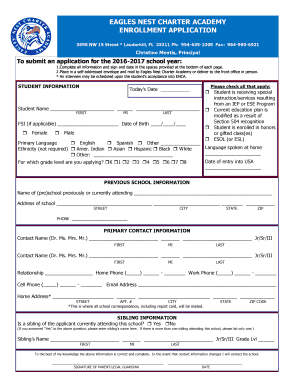
Filling out the EAGLES NEST CHARTER ACADEMY ENROLLMENT APPLICATION is a crucial step in the enrollment process for prospective students. This guide provides clear, step-by-step instructions to assist users in completing the application accurately and effectively.
Follow the steps to complete the enrollment application seamlessly.
- Click the ‘Get Form’ button to obtain the enrollment application and open it in your preferred editor.
- Enter today's date in the designated field at the top of the form, ensuring the format is clear.
- Fill in the student's name, including first name, middle initial, and last name, in the provided spaces.
- If applicable, include the student's Florida Student Identification (FSI) number and date of birth in the specified formats.
- Select the appropriate checkbox indicating the student's gender.
- Indicate any special instructions or services the student is receiving by checking the applicable boxes.
- Specify the primary language spoken and the language spoken at home, noting any required options.
- Provide ethnicity information if desired, by checking the appropriate box or filling in additional details.
- Fill in the date of entry into the USA and the grade level for which the student is applying.
- Complete the section for previous school information, ensuring to fill in the name, address, and contact numbers accurately.
- In the primary contact information section, enter details such as additional contact names, relationship, phone numbers, and email address.
- If there is a sibling attending the academy, check 'Yes' and fill in the sibling’s name and grade level.
- Review and provide any medical history that is relevant to the student’s enrollment.
- Complete the media information section regarding permission for photography.
- Fill in the immunization section, answering all applicable queries.
- Indicate any behavioral history that may affect school participation, explaining as necessary.
- Acknowledge student and parent responsibilities by confirming understanding of the dress code and volunteer service requirements.
- Sign and date the application where indicated, ensuring all provided information is true and complete.
- Once all sections are completed, save your changes, and prepare to either download, print, or submit the application.
Complete your enrollment application online to secure your child's place at Eagles Nest Charter Academy.
Industry-leading security and compliance
US Legal Forms protects your data by complying with industry-specific security standards.
-
In businnes since 199725+ years providing professional legal documents.
-
Accredited businessGuarantees that a business meets BBB accreditation standards in the US and Canada.
-
Secured by BraintreeValidated Level 1 PCI DSS compliant payment gateway that accepts most major credit and debit card brands from across the globe.