Loading
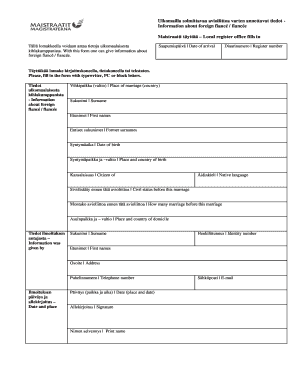
Get Ulkomailla Solmittavaa Avioliittoa Varten Annettavat Tiedot Maist29.doc - Lomake
How it works
-

Open form follow the instructions
-

Easily sign the form with your finger
-

Send filled & signed form or save
How to fill out the Ulkomailla Solmittavaa Avioliittoa Varten Annettavat Tiedot Maist29.doc - Lomake online
This guide provides a comprehensive overview of how to fill out the Ulkomailla Solmittavaa Avioliittoa Varten Annettavat Tiedot Maist29.doc - Lomake online, ensuring you provide all necessary information accurately. Follow these instructions to complete the form efficiently and effectively.
Follow the steps to fill out the form correctly.
- Use the ‘Get Form’ button to access the form in your preferred editor. This will allow you to begin completing the document online.
- Provide the date of arrival in the designated field labeled 'Saapumispäivä'. Make sure to format it correctly according to the instructions.
- Enter the register number in the 'Diaarinumero' section. Ensure this number is accurate, as it is crucial for future references.
- Fill in your foreign fiancé or fiancée's surname ('Sukunimi') as it appears on official documents.
- In the 'Etunimet' field, list the first names of your fiancé or fiancée, ensuring the spelling matches their identification documents.
- If applicable, provide any former surnames in the 'Entiset sukunimet' section.
- Input the date of birth ('Syntymäaika') of your fiancé or fiancée in the required format.
- Complete the 'Syntymäpaikka ja –valtio' section by stating the place and country of birth.
- Specify their nationality in the 'Kansalaisuus' field.
- Indicate the native language of your fiancé or fiancée in the 'Äidinkieli' section.
- For the field labeled 'Siviilisääty ennen tätä avioliittoa', state your fiancé or fiancée's civil status prior to this marriage.
- In 'Montako avioliittoa ennen tätä avioliittoa', specify the number of previous marriages.
- Complete the 'Asuinpaikka ja –valtio' section with their current place and country of residence.
- Provide your own details in the 'Tiedot ilmoituksen antajasta' section, including your surname, identity number, first names, address, and telephone number.
- Fill in the email address in the designated field for communication purposes.
- In the 'Ilmoituksen päiväys ja allekirjoitus' section, indicate the date and place of the signing.
- Sign where it says 'Allekirjoitus' to authenticate the form.
- Finally, print your name in the 'Nimen selvennys' section to clarify your signature.
- Once you have completed all sections, save your changes. You can also download, print, or share the form as needed.
Complete your forms online today to ensure smooth processing!
Industry-leading security and compliance
US Legal Forms protects your data by complying with industry-specific security standards.
-
In businnes since 199725+ years providing professional legal documents.
-
Accredited businessGuarantees that a business meets BBB accreditation standards in the US and Canada.
-
Secured by BraintreeValidated Level 1 PCI DSS compliant payment gateway that accepts most major credit and debit card brands from across the globe.