Loading
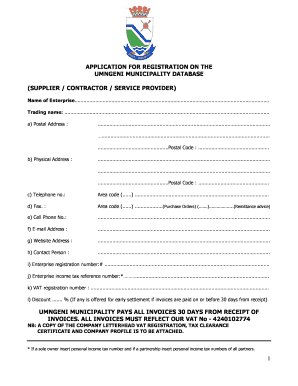
Get Application For Registration On The Umngeni Municipality ... - Umngeni Gov
How it works
-

Open form follow the instructions
-

Easily sign the form with your finger
-

Send filled & signed form or save
How to fill out the APPLICATION FOR REGISTRATION ON THE UMNGENI MUNICIPALITY DATABASE online
This guide provides clear, step-by-step instructions for filling out the Application for Registration on the Umngeni Municipality Database for suppliers, contractors, or service providers. By following these steps, users can efficiently complete the form and ensure all necessary information is accurately provided.
Follow the steps to successfully complete your application.
- Click the ‘Get Form’ button to access the application form and open it in your document editor.
- Begin by entering the name of your enterprise and its trading name in the designated fields.
- Provide your postal address, physical address, and include the relevant postal codes.
- Fill in your contact information, including telephone number, fax number, cell phone number, email address, and website address.
- Identify and provide the name of a contact person for your enterprise.
- Enter the enterprise registration number and the income tax reference number. If applicable, include the VAT registration number.
- Indicate if you offer any discount for early settlement of invoices.
- Tick the appropriate box to specify the type of enterprise (e.g., sole trader, partnership, company).
- Briefly describe your principal business activities.
- Select the location of your enterprise by ticking the relevant box.
- List the street addresses of all facilities used by your enterprise.
- If applicable, indicate whether you share facilities and provide details.
- List all partners, proprietors, and shareholders, including their identities and statuses, ensuring the total equals 100%.
- Confirm whether your enterprise is registered or holds a business license, providing details as necessary.
- Detail any trade associations or professional bodies with which you have membership.
- State if your enterprise existed under a previous name and provide the previous name and reason for change.
- Indicate the number of full-time and part-time employees, including specific categories like historically disadvantaged individuals or people with disabilities.
- Complete the banking details section, providing necessary authorization for payments.
- Certify the correctness of the information provided and sign the document.
- After completing the form, save your changes, and prepare to download, print, or share the document as needed.
Ensure your application is filled out completely and accurately, then submit it online to complete your registration process.
The district consists of four local municipalities: Endumeni, Nquthu, uMsinga and Umvoti. The district lies between the main N3 Corridor between Durban and Gauteng and the Coastal Corridor, running along the east coast.
Industry-leading security and compliance
US Legal Forms protects your data by complying with industry-specific security standards.
-
In businnes since 199725+ years providing professional legal documents.
-
Accredited businessGuarantees that a business meets BBB accreditation standards in the US and Canada.
-
Secured by BraintreeValidated Level 1 PCI DSS compliant payment gateway that accepts most major credit and debit card brands from across the globe.