Loading
Get Ca Enf-10a 2011-2026
How it works
-

Open form follow the instructions
-

Easily sign the form with your finger
-

Send filled & signed form or save
How to fill out the CA ENF-10A online
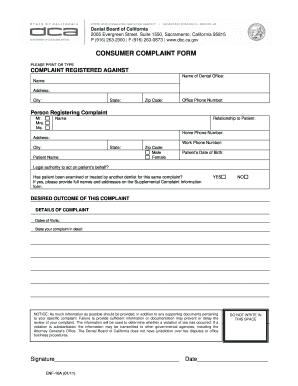
The CA ENF-10A form is designed for individuals wishing to file a complaint against a dental office in California. This guide provides clear, step-by-step instructions on how to complete the form online, ensuring that you provide all necessary information to facilitate your complaint.
Follow the steps to complete your CA ENF-10A complaint form online.
- Click ‘Get Form’ button to obtain the CA ENF-10A form and open it in your online editor.
- In the 'Complaint Registered Against' section, provide the name of the dental office and individual you're filing the complaint against. Ensure to fill in the office phone number, along with the complete address including city, state, and zip code.
- Next, in the 'Person Registering Complaint' section, select the appropriate title (Mr., Mrs., Ms.) and indicate your relationship to the patient. Fill in your full name, home phone number, work phone number, and address.
- Provide the patient's information including their name, date of birth, and gender. Indicate if you have the legal authority to act on the patient's behalf.
- Answer whether the patient has been examined or treated by another dentist for the same complaint. If 'Yes', include details in the Supplemental Complaint Information section.
- Describe the desired outcome of your complaint in the designated section, followed by detailing the complaint itself. Include specific dates of visits and as much relevant information and supporting documents as possible.
- Make sure your signature is included in the specified area after reviewing all information for accuracy. Also, do not forget to date the form.
- Finally, save your changes, and download, print, or share your completed form as needed.
Complete your CA ENF-10A form online to ensure your complaint is submitted efficiently.
Related links form
Filling out a certificate of exemption involves providing your personal information, including your name and tax identification number. It's important to indicate your reason for exemption clearly. For ease, you can use forms like CA ENF-10A from uslegalforms to guide you through the process accurately.