Loading
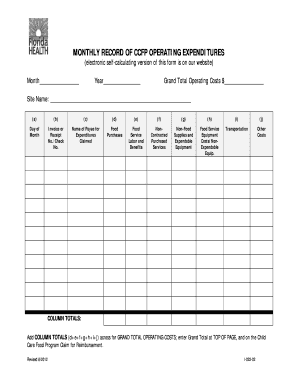
Get Monthly Record Of Ccfp Operating Expenditures
How it works
-

Open form follow the instructions
-

Easily sign the form with your finger
-

Send filled & signed form or save
How to fill out the MONTHLY RECORD OF CCFP OPERATING EXPENDITURES online
Filling out the Monthly Record of CCFP Operating Expenditures is essential for maintaining the financial integrity of your funds. This guide provides clear and supportive instructions on how to accurately complete the form online.
Follow the steps to accurately complete the form.
- Click ‘Get Form’ button to obtain the form and open it in the editor.
- In the designated area, enter the month for which you are reporting. Ensure that this is clearly noted at the top of the form.
- Next, input the year corresponding to the month entered. This helps in organizing your records appropriately.
- Locate the 'Grand Total Operating Costs' section and prepare to enter the total from your calculations after filling out the fields below.
- Fill in the 'Site Name' field with the name of the site for which you are reporting expenditures.
- For each day of the month, in the 'Day of Month' column, list the dates for which you have expenditures to report.
- In the 'Invoice or Receipt No./Check No.' column, record the corresponding identification numbers for each expense documented.
- In the 'Name of Payee for Expenditures Claimed' column, list the names of entities or individuals to whom payments were made.
- Proceed to fill out the subsequent columns: 'Food Purchases', 'Food Service Labor and Benefits', 'Non-Contracted Purchased Services', 'Non-Food Supplies and Expendable Equipment', 'Food Service Equipment Costs/Non-Expendable Equipment', 'Transportation', and 'Other Costs' appropriately with the associated amounts for each category.
- At the end of the form, make sure to total the expenditures in each column (d+e+f+g+h+i+j). This total will constitute your Grand Total Operating Costs.
- Enter the Grand Total Operating Costs at the top of the form as well as on your Child Care Food Program Claim for Reimbursement.
- Lastly, save your changes, and consider downloading, printing, or sharing the completed form as needed.
Complete your documents online today for effective financial management.
The National School Lunch Program (NSLP) provides nutritious, well-balanced meals, including lunch and breakfast, to ensure your child is focused and full during the school day. Although COVID-19 has allowed schools to provide most, if not all, students with reduced-price or free meals, this benefit ends June 30, 2022.
Industry-leading security and compliance
US Legal Forms protects your data by complying with industry-specific security standards.
-
In businnes since 199725+ years providing professional legal documents.
-
Accredited businessGuarantees that a business meets BBB accreditation standards in the US and Canada.
-
Secured by BraintreeValidated Level 1 PCI DSS compliant payment gateway that accepts most major credit and debit card brands from across the globe.