Loading
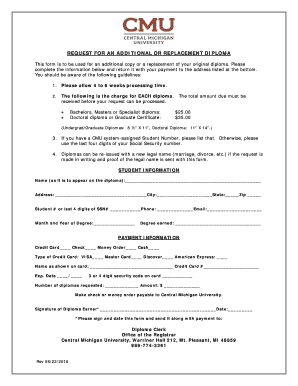
Get Diploma Replacement Form - Central Michigan University - Cmich
How it works
-

Open form follow the instructions
-

Easily sign the form with your finger
-

Send filled & signed form or save
How to fill out the Diploma Replacement Form - Central Michigan University - Cmich online
Filling out the Diploma Replacement Form for Central Michigan University is a straightforward process aimed at obtaining an additional or replacement diploma. This guide offers step-by-step instructions to help you complete the form accurately and efficiently.
Follow the steps to successfully complete your diploma replacement request.
- Click ‘Get Form’ button to obtain the form and open it in the editor.
- Begin by entering your name as it should appear on the diploma. Ensure the spelling is correct to avoid any discrepancies during processing.
- Fill in your address, including city, state, and zip code, to ensure that your diploma is delivered to the correct location.
- If you have a CMU system-assigned student number, enter that. If not, provide the last four digits of your Social Security number for identification purposes.
- Include your phone number and email address. This information will be used for communication regarding your request.
- Indicate the month and year you earned your degree to assist in locating your records.
- Specify the degree you earned to ensure the correct diploma is issued.
- In the payment information section, select your preferred payment method (credit card, check, money order, or cash). If using a credit card, provide the card type, name as it appears on the card, credit card number, expiration date, and security code.
- Indicate the number of diplomas you are requesting and calculate the total amount due, ensuring to check the pricing structure for each type of diploma requested.
- Review the entire form for accuracy, then sign and date it in the designated area. This signature confirms your request for the diploma replacement.
- Finally, submit the completed form with your payment to the listed address to process your request.
Complete your Diploma Replacement Form online for a smooth and efficient application process.
Transcript Request You can access an unofficial copy of your transcript in the Student Portal. To request an official transcript, please visit registrars.cmich.edu. The CMU Student Portal offers access to a number of features.
Industry-leading security and compliance
US Legal Forms protects your data by complying with industry-specific security standards.
-
In businnes since 199725+ years providing professional legal documents.
-
Accredited businessGuarantees that a business meets BBB accreditation standards in the US and Canada.
-
Secured by BraintreeValidated Level 1 PCI DSS compliant payment gateway that accepts most major credit and debit card brands from across the globe.