Loading
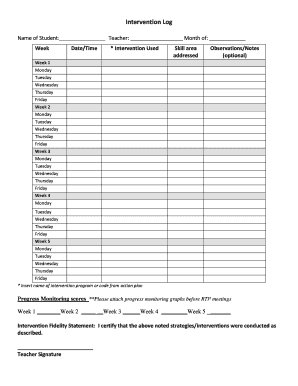
Get Intervention Log
How it works
-

Open form follow the instructions
-

Easily sign the form with your finger
-

Send filled & signed form or save
How to fill out the Intervention Log online
The Intervention Log is an essential tool for documenting the interventions used to support students' learning and track their progress over time. This guide will provide clear, step-by-step instructions on how to complete the log effectively and accurately online.
Follow the steps to successfully complete the Intervention Log online.
- Press the ‘Get Form’ button to obtain the Intervention Log and open it in the online editor.
- Begin by entering the name of the student in the designated field at the top of the form.
- Next, specify the week of the intervention by selecting the appropriate week option.
- Fill in your name as the teacher in the space provided along with the current month.
- Record the date and time of the intervention activity in the respective fields.
- In the 'Intervention Used' section, insert the name of the intervention program or the code as described in the action plan.
- Identify the skill area addressed by the intervention in the corresponding field.
- You may include any observations or notes in the optional section, providing relevant context or feedback regarding the intervention.
- Proceed to fill in the intervention record for each day of the week across all five weeks.
- Enter the progress monitoring scores for each week in the designated spaces to track student advancement.
- Attach any progress monitoring graphs that are required before the response to intervention meetings.
- Finally, complete the Intervention Fidelity Statement by signing in the designated area to certify the accuracy of the noted strategies.
- Once all fields are completed, save your changes. You can also choose to download, print, or share the completed form as needed.
Start completing the Intervention Log online today for better tracking of student interventions!
How to Write an Intervention Plan Identify the student(s). Which student will you be supporting? ... Choose an intervention type and tier. ... Create a goal for the student's intervention program. ... Select an intervention strategy. ... Assign an adult champion. ... Set a timeline. ... Establish a method for progress monitoring.