Loading
Form preview
  • US Legal Forms
  • Form Library
  • More Forms
  • More Uncategorized Forms
  • Combine Tsp Accounts

Get Combine Tsp Accounts

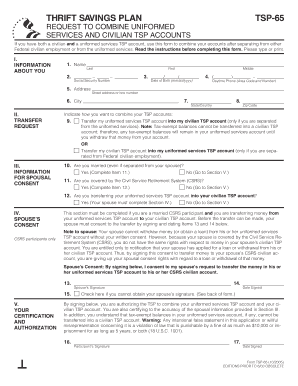
THRIFT SAVINGS PLAN TSP65 REQUEST TO COMBINE UNIFORMED SERVICES AND CIVILIAN TSP ACCOUNTS If you have both a civilian and a uniformed services TSP account, use this form to combine your accounts after.

How it works

  1. Open form

    Open form follow the instructions

  2. Easily sign form

    Easily sign the form with your finger

  3. Share form

    Send filled & signed form or save

How to fill out the Combine Tsp Accounts online

Combining your Thrift Savings Plan (TSP) accounts can simplify your financial management after separating from Federal civilian employment or the uniformed services. This guide provides detailed instructions to help you navigate the online process of completing the Combine TSP Accounts form, ensuring that you fill it out correctly and efficiently.

Follow the steps to successfully complete the form online.

  1. Press the ‘Get Form’ button to access the Combine TSP Accounts form and open it in your preferred editor.
  2. Provide your personal information in Section I, including your last name, first name, middle initial, Social Security number, date of birth, daytime phone number, and address.
  3. In Section II, select your preferred method of combining accounts by checking one of the specified boxes—specified for transferring either your uniformed services TSP account into your civilian TSP account or vice versa.
  4. If you are married, complete Section III by indicating your marital status. If ‘Yes,’ provide additional details as prompted regarding your spouse's coverage under the Civil Service Retirement System (CSRS) to proceed.
  5. Complete Section IV if you are a CSRS participant and require your spouse's consent for the transfer. Your spouse must sign and date the specified items to validate their consent.
  6. In Section V, confirm the accuracy of the information provided and authorize the TSP to combine your accounts by signing and dating the form. Ensure to check the box if you cannot obtain your spouse’s signature.
  7. Once all sections are completed, review the entire form for accuracy. Save your changes, and then either download, print, or share the form as needed. Ensure to keep a copy for your records.

Take action now and complete your Combine TSP Accounts form online today!

Get form

Experience a faster way to fill out and sign forms on the web. Access the most extensive library of templates available.
Get form

Related content

Forms | Thrift Savings Plan
Request a transfer of Roth money from an applicable retirement plan into the Roth balance...
Learn more
5 CFR § 1600.33 - Combining uniformed services...
(a) An account balance can be combined with another once the TSP is informed (by the...
Learn more
Job shop scheduling - Wikipedia
Job shop scheduling or the job-shop problem (JSP) is an optimization problem in computer...
Learn more

Related links form

AAC SETT WORKSHEET - MN Low Incidence Projects - Mnlowincidenceprojects Seguros De Transporte Para Exportaciones - Proexport Colombia Reassessment Agreement - Excelsior Springs School District Cayman 1st Precertification

Questions & Answers

Get answers to your most pressing questions about US Legal Forms API.

Contact support

When you separate, you can leave your entire account balance in the TSP if it is $200 or more. Your account will continue to accrue earnings and you can continue to change the way your money is invested in the five TSP investment funds by making interfund transfers. You can make an interfund transfer at any time.

Yes. Participants may roll over eligible rollover distributions from their TSP accounts to a qualified trust or an eligible retirement plan (as defined in IRC § 402(c)(8)). (See 5 USC § 8433(c)(2).) An eligible retirement plan can be either an IRA or an eligible employer plan.

The taxable portion of your withdrawal is subject to federal income tax at your ordinary rate. Also, you may have to pay state income tax. An additional IRS early withdrawal penalty of 10% may apply if you're under the age of 59½.

It generally takes between 7 to 10 business days to process your request once you've properly completed and submitted it. We disburse withdrawals each business day. You can check My Account at tsp.gov or call the ThriftLine to find out the status of your withdrawal request, including whether the payment has been made.

Separated participants who have a uniformed services and a civilian account also have the option of combining both accounts into one using Form TSP-65.

When you log in to My Account, you can use an online tool to start the rollover contribution process. You'll contact the provider of your eligible plan and request a rollover distribution. You'll then send eligible distribution documentation and any rollover checks to the TSP.

Although the account numbers are the same, the funds in your two TSP accounts remain separate. That means that you manage the accounts separately, and most rules and limitations apply individually to each account. Managing your accounts separately becomes especially important when you consider taking money out.

Get This Form Now!

Use professional pre-built templates to fill in and sign documents online faster. Get access to thousands of forms.
Get form
If you believe that this page should be taken down, please follow our DMCA take down processhere.

Industry-leading security and compliance

US Legal Forms protects your data by complying with industry-specific security standards.
  • In businnes since 1997
    25+ years providing professional legal documents.
  • Accredited business
    Guarantees that a business meets BBB accreditation standards in the US and Canada.
  • Secured by Braintree
    Validated Level 1 PCI DSS compliant payment gateway that accepts most major credit and debit card brands from across the globe.
Get Combine Tsp Accounts
Get form
  • Adoption
  • Bankruptcy
  • Contractors
  • Divorce
  • Home Sales
  • Employment
  • Identity Theft
  • Incorporation
  • Landlord Tenant
  • Living Trust
  • Name Change
  • Personal Planning
  • Small Business
  • Wills & Estates
  • Packages A-Z
  • Affidavits
  • Bankruptcy
  • Bill of Sale
  • Corporate - LLC
  • Divorce
  • Employment
  • Identity Theft
  • Internet Technology
  • Landlord Tenant
  • Living Wills
  • Name Change
  • Power of Attorney
  • Real Estate
  • Small Estates
  • Wills
  • All Forms
  • Forms A-Z
  • Form Library
  • Legal Hub
  • About Us
  • Help Portal
  • Legal Resources
  • Blog
  • Affiliates
  • Contact Us
  • Delete My Account
  • Site Map
  • Industries
  • Forms in Spanish
  • Localized Forms
  • State-specific Forms
  • Forms Kit
  • Real Estate Handbook
  • All Guides
  • Notarize
  • Incorporation services
  • For Consumers
  • For Small Business
  • For Attorneys
  • USLegal
  • FormsPass
  • pdfFiller
  • signNow
  • altaFlow
  • DocHub
  • Instapage
Form Packages
  • Adoption
  • Bankruptcy
  • Contractors
  • Divorce
  • Home Sales
  • Employment
  • Identity Theft
  • Incorporation
  • Landlord Tenant
  • Living Trust
  • Name Change
  • Personal Planning
  • Small Business
  • Wills & Estates
  • Packages A-Z
Form Categories
  • Affidavits
  • Bankruptcy
  • Bill of Sale
  • Corporate - LLC
  • Divorce
  • Employment
  • Identity Theft
  • Internet Technology
  • Landlord Tenant
  • Living Wills
  • Name Change
  • Power of Attorney
  • Real Estate
  • Small Estates
  • Wills
  • All Forms
  • Forms A-Z
  • Form Library
Customer Service
  • Legal Hub
  • About Us
  • Help Portal
  • Legal Resources
  • Blog
  • Affiliates
  • Contact Us
  • Delete My Account
  • Site Map
  • Industries
  • Forms in Spanish
  • Localized Forms
  • State-specific Forms
  • Forms Kit
Legal Guides
  • Real Estate Handbook
  • All Guides
Prepared for you
  • Notarize
  • Incorporation services
Our Customers
  • For Consumers
  • For Small Business
  • For Attorneys
Our Sites
  • USLegal
  • FormsPass
  • pdfFiller
  • signNow
  • altaFlow
  • DocHub
  • Instapage
Social Media
Call us now toll free:
+1 833 426 79 33
As seen in:
© Copyright 1999-2026 airSlate Legal Forms, Inc. 3720 Flowood Dr, Flowood, Mississippi 39232
  • Your Privacy Choices
  • Terms of Service
  • Privacy Notice
  • Content Takedown Policy
  • Bug Bounty Program