Loading
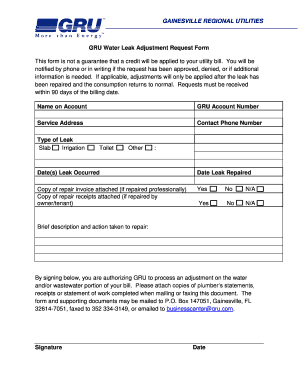
Get Gru Water Leak Adjustment Request Form Name On Account Gru ...
How it works
-

Open form follow the instructions
-

Easily sign the form with your finger
-

Send filled & signed form or save
How to fill out the GRU Water Leak Adjustment Request Form Name On Account GRU online
Filling out the GRU Water Leak Adjustment Request Form is an important step for residents seeking adjustments on their utility bills due to water leaks. This guide provides clear instructions to help you complete the form accurately and efficiently.
Follow the steps to complete the form effectively.
- Click ‘Get Form’ button to obtain the request form and open it for editing.
- Begin by filling in the 'Name on Account' section with the name associated with your GRU account.
- Enter your GRU Account Number to ensure your request is processed for the correct account.
- Provide the Service Address where the water leak occurred. This helps identify the specific location linked to the account.
- Fill in your Contact Phone Number so the utilities company can reach you for any follow-up or clarification.
- Select the Type of Leak by checking the appropriate box: Slab, Irrigation, Toilet, or Other.
- Indicate the Date(s) Leak Occurred to provide context for the request.
- Enter the Date Leak Repaired to confirm when the issue was resolved.
- Attach a Copy of Repair Invoice if the repair was handled professionally, or a Copy of Repair Receipts if it was done by the owner/tenant.
- Provide a Brief Description and Action Taken to Repair in the provided field.
- Sign and date the form to authorize GRU to process the adjustment on your bill.
- Review all entries for accuracy before submitting. Save changes, and prepare to download, print, or share the form as needed.
Complete your request form online to ensure a smooth and efficient process.
Related links form
Our New Payment Locations! CVS. Walgreens. Family Dollar. Dollar General. 7-11.
Industry-leading security and compliance
US Legal Forms protects your data by complying with industry-specific security standards.
-
In businnes since 199725+ years providing professional legal documents.
-
Accredited businessGuarantees that a business meets BBB accreditation standards in the US and Canada.
-
Secured by BraintreeValidated Level 1 PCI DSS compliant payment gateway that accepts most major credit and debit card brands from across the globe.