Loading
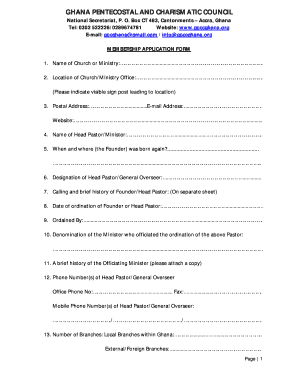
Get Gpcc Membership
How it works
-

Open form follow the instructions
-

Easily sign the form with your finger
-

Send filled & signed form or save
How to fill out the Gpcc Membership online
Filling out the Gpcc Membership application form online is a straightforward process designed to gather essential information about your church or ministry. This guide will provide you with clear, step-by-step instructions to ensure you complete each section accurately and efficiently.
Follow the steps to complete the Gpcc Membership application form
- Click ‘Get Form’ button to obtain the membership application form and open it in the editor.
- Begin by entering the name of your church or ministry in the designated field. Ensure that the name accurately reflects your organization's official title.
- Next, provide the location of your church or ministry office. Include details about any visible signposts that lead to your location for easy identification.
- Fill in your postal address, email address, and website if applicable. This information is crucial for communication purposes.
- Enter the name of the head pastor or minister. This should be the individual responsible for the church or ministry.
- Indicate when and where the founder of your ministry was born again. This information reflects the spiritual foundation of your organization.
- State the designation of the head pastor or general overseer in the designated field.
- Provide a brief history of the calling for the founder or head pastor on a separate sheet, detailing their journey and experiences.
- Input the date of ordination for the founder or head pastor. This information adds credibility to their ministry.
- Note who officiated the ordination of the above pastor in the corresponding field.
- Specify the denomination of the minister who officiated the ordination and include a brief history of this officiating minister on a separate sheet.
- Provide contact numbers for the head pastor or general overseer, including office phone, fax, and multiple mobile phone numbers.
- Indicate the number of branches your church has, distinguishing between local branches within Ghana and any external or foreign branches.
- Complete the section regarding the number of church workers, categorizing them into full-time ministers, unpaid or tent ministry workers, and paid auxiliary staff.
- Fill in the total number of church members, breaking it down into adults and children for both local and external membership.
- Provide the names of two referees, ensuring one is an existing full member of GPC.
- List the current names and contacts of church officers, including the national executive and board of trustees, and attach a copy.
- Attach three copies of your constitution and tenets of faith.
- Provide an organizational structure and attach a copy for reference.
- Include a copy of your certificate of registration.
- Submit a brief history of your church or ministry on a separate sheet.
- Attach a recommendation letter from your regional chairman of GPCC.
- Describe the social development projects your church is currently involved in, such as schools or hospitals.
- Conclude by obtaining the signatures of the general secretary and head pastor, and include the church stamp and date for verification.
- After completing the form, ensure to save changes, download, print, or share it as necessary.
Now that you have the guidance needed, complete your Gpcc Membership application online today.
Related links form
Industry-leading security and compliance
US Legal Forms protects your data by complying with industry-specific security standards.
-
In businnes since 199725+ years providing professional legal documents.
-
Accredited businessGuarantees that a business meets BBB accreditation standards in the US and Canada.
-
Secured by BraintreeValidated Level 1 PCI DSS compliant payment gateway that accepts most major credit and debit card brands from across the globe.