Loading
Get At360 Manual - Finance Alberta
How it works
-

Open form follow the instructions
-

Easily sign the form with your finger
-

Send filled & signed form or save
How to fill out the At360 Manual - Finance Alberta online
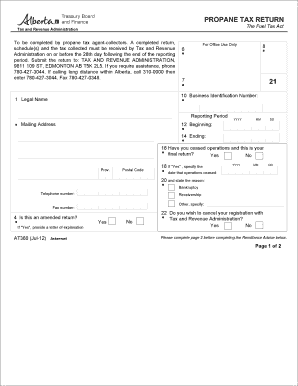
This guide provides a comprehensive overview of the At360 Manual - Finance Alberta, specifically focusing on filling out the propane tax return. By following the steps outlined in this guide, users can efficiently complete this essential document online.
Follow the steps to successfully complete the propane tax return.
- Click ‘Get Form’ button to obtain the form and open it in the relevant online editor.
- Fill in your business identification number at the top of the form. This number is essential for identifying your business with Tax and Revenue Administration.
- Provide your legal name and mailing address. Ensure that all details such as province and postal code are accurately filled in.
- Enter the reporting period by specifying the beginning and ending dates in YYYY-MM-DD format.
- Indicate whether you have ceased operations and if this is your final return by selecting 'Yes' or 'No'. If 'Yes', specify the date operations ceased and the reason for cessation.
- Indicate if this is an amended return. If it is, provide a letter of explanation attached to the form.
- Specify whether you wish to cancel your registration with Tax and Revenue Administration.
- Complete the Schedule of Propane Sales to Retailers (form AT361) if applicable. Calculate the total taxable litres of propane sold to retailers and consumers.
- Calculate the total tax due by multiplying the total taxable litres by the tax rate ($0.065).
- If enclosing payment, complete the Remittance Advice on the form. Ensure that payment is made in Canadian funds and cheques are payable to the Government of Alberta.
- Sign and date the certification section, confirming that you are an authorized signing officer of the business and that the information provided is true and accurate.
- Finally, save your changes, download the completed form, and print or share it as necessary. Make sure to send it to Tax and Revenue Administration by the specified deadline.
Complete your propane tax return online today to ensure timely submission and compliance.
Industry-leading security and compliance
US Legal Forms protects your data by complying with industry-specific security standards.
-
In businnes since 199725+ years providing professional legal documents.
-
Accredited businessGuarantees that a business meets BBB accreditation standards in the US and Canada.
-
Secured by BraintreeValidated Level 1 PCI DSS compliant payment gateway that accepts most major credit and debit card brands from across the globe.