Loading
Get Occupants - Claims Pages
How it works
-

Open form follow the instructions
-

Easily sign the form with your finger
-

Send filled & signed form or save
How to fill out the OCCUPANTS - Claims Pages online
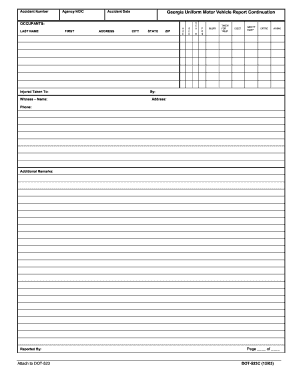
Filling out the OCCUPANTS - Claims Pages is an important step in documenting an accident and ensuring that all parties involved are accurately represented. This guide will provide clear, step-by-step instructions on how to effectively complete this form online, ensuring that you capture all necessary information.
Follow the steps to complete the OCCUPANTS - Claims Pages.
- Click the ‘Get Form’ button to access the OCCUPANTS - Claims Pages and open it in the online editor.
- Begin by filling in the accident number and agency NCIC at the top of the form. Ensure that you enter the details accurately to help with claim processing.
- Next, input the accident date, which is necessary for records and references. Be sure to format the date correctly as specified.
- In the OCCUPANTS section, fill in the last name and first name of each occupant involved in the accident. Complete this for every occupant listed.
- Record the address, city, state, and ZIP code for each occupant. This information is vital for communication and follow-up regarding claims.
- Indicate the age and sex of each occupant. This demographic information can be relevant for claims processing.
- Provide vehicle number and position. Make sure to specify the type of vehicle and its role in the accident.
- Document the nature of any injuries by detailing if the individual was taken for treatment, ejected from the vehicle, or required safety equipment.
- If applicable, include any remarks in the additional remarks section, which can provide context or specifics not covered in other fields.
- Lastly, fill out the section for who reported the incident, including their contact details. Attach any necessary documents to the DOT-523 as indicated.
- Once all fields are completed, review the form for accuracy. You can save changes, download, print, or share the form according to your needs.
Complete your documents online for a smoother claims process.
They are: Death benefit claim. Maturity benefit claim (Only in case of Term Insurance with Return of Premium or TROP) Rider benefit claim.