Loading
Get Sublease Agreement - Amazon S3
How it works
-

Open form follow the instructions
-

Easily sign the form with your finger
-

Send filled & signed form or save
How to fill out the SUBLEASE AGREEMENT - Amazon S3 online
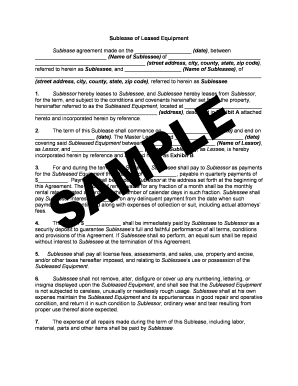
Filling out a sublease agreement is an essential step in ensuring that both parties understand their rights and responsibilities. This guide will navigate you through each section of the SUBLEASE AGREEMENT - Amazon S3, providing clear instructions for a seamless online experience.
Follow the steps to complete your sublease agreement accurately.
- Click ‘Get Form’ button to access the form and open it in your document editor.
- Begin by entering the date of the agreement in the designated field at the top. This is crucial as it marks the official start of the sublease.
- Provide the name and address of the Sublessee in the respective fields. Ensure accuracy to avoid issues with communication or service delivery.
- Next, indicate the name and address of the Sublessor in the corresponding fields. Review these details carefully, as they are key points of contact.
- In section 1, fill in the specific address of the Subleased Equipment. This detail helps define the scope of the sublease.
- Enter the start and end dates of the sublease term in section 2. Highlight any key dates to ensure both parties are aware of the timeline.
- Specify the total rental payment and the quarterly payment amounts in section 3. Double-check these amounts to prevent disputes later.
- In section 4, enter the security deposit amount. This deposit is crucial for the protection of the Sublessor's interests.
- Section 5 requires you to acknowledge your responsibility for any applicable fees or taxes related to the Subleased Equipment, which ensures compliance.
- Sections 6 and 7 outline maintenance and repair responsibilities. Make sure to read these thoroughly to understand your obligations.
- Review the indemnity and insurance requirements in sections 10 and 12 to ensure you have the necessary coverage and agreements in place.
- Fill in the governing state laws and confirm your understanding of default conditions listed in sections 14 and 15.
- Lastly, ensure that all parties sign and date the agreement at the bottom, and attach any required Exhibits A and B, as specified.
- After completing the form, save your changes. You may also choose to download, print, or share the completed sublease agreement with the appropriate parties.
Complete your SUBLEASE AGREEMENT online today for a hassle-free rental process.
Lessee Tenant shall not assign this Lease or sublet any portion of the Premises Real Property without prior written consent of the Lessor, which shall not be unreasonably withheld. Any such assignment or subletting without consent shall be void and, at the option of the Lessor, may terminate this Lease.