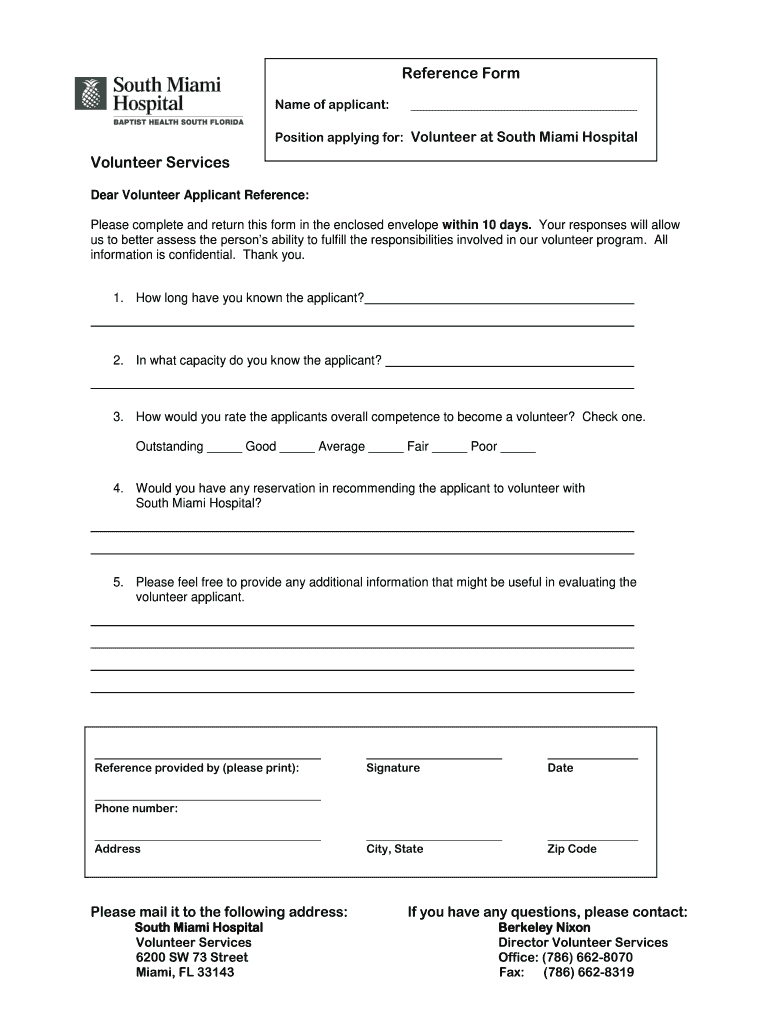
D envelope within 10 days. Your responses will allow us to better assess the person’s ability to fulfill the responsibilities involved in our volunteer program. All information is confidential. Thank you. 1. How long have you known the applicant? 2. In what capacity do you know the applicant? 3. How would you rate the applicants overall competence to become a volunteer? Check one. Outstanding _____ Good _____ Average _____ Fair _____ Poor _____ 4. Would you have any reservation in recommendi.
Loading

Open form follow the instructions

Easily sign the form with your finger

Send filled & signed form or save
How to fill out the FL South Miami Hospital Reference Form online
Filling out the FL South Miami Hospital Reference Form online is a straightforward process that ensures your application for volunteering is evaluated efficiently. This guide will provide step-by-step instructions on completing each section of the form with confidence.
Follow the steps to successfully complete the reference form.
- Click ‘Get Form’ button to obtain the form and open it in the editor.
- Begin by entering the name of the applicant in the designated field to identify the individual for whom the reference is being provided.
- Indicate the position the applicant is applying for by selecting 'Volunteer at South Miami Hospital' from the available options.
- In the first question, provide the duration of time you have known the applicant. This helps assess the depth of your knowledge about their capabilities.
- For the second question, clarify in what capacity you know the applicant, such as a colleague, friend, or supervisor. This context is vital for the evaluation.
- Rate the applicant's overall competence to become a volunteer by checking one of the provided options: Outstanding, Good, Average, Fair, or Poor. Choose the option that best represents your assessment.
- Respond to the question about any reservations you might have in recommending the applicant. Provide a clear yes or no answer along with brief reasoning if applicable.
- Use the final section to include any additional information that you feel may assist in evaluating the applicant. This is an opportunity to share specific examples of their skills or character.
- In the reference provided by section, print your name followed by your signature in the designated areas. Your signature validates your endorsement of the applicant.
- Finally, enter the date, city, state, zip code, and your phone number and address in the corresponding fields to complete the reference form.
- After reviewing all entered information for accuracy, save the changes, then download, print, or share the completed form as needed.
Complete your reference forms online today to support prospective volunteers at South Miami Hospital.
Experience a faster way to fill out and sign forms on the web. Access the most extensive library of templates available.
Related content
If you are requesting certification of a state license, please complete and submit the...
The following are the forms to be used for the submission of protocol information for IRB...
Easily search for Member details, including eligibility status, covered benefits and...
Get answers to your most pressing questions about US Legal Forms API.
What are the beliefs of Baptist healthcare?
Baptist Health believes in compassionate care, integrity, and excellence in health services. Their mission emphasizes service to others and maintaining the highest standards of quality in healthcare. When you navigate the healthcare processes, including the FL South Miami Hospital Reference Form, you can trust that these principles guide every aspect of their care.
Who is the CEO of South Miami Hospital?
As of the latest update, the CEO of South Miami Hospital is typically appointed from within the Baptist Health leadership team. This ensures that your hospital is guided by experienced individuals dedicated to providing exceptional care. Understanding the leadership can enhance your confidence when completing forms like the FL South Miami Hospital Reference Form.
What is the phone number for Baptist Health Lexington Medical Records?
You can reach the Baptist Health Lexington Medical Records department at (859) 260-6100. This line connects you directly to the team that can assist you with obtaining your medical records or answering any related queries. For forms like the FL South Miami Hospital Reference Form, having your records on hand can streamline your process.
What does the pineapple mean at Baptist Health?
The pineapple stands for hospitality, welcoming individuals in need of care with open arms. It represents Baptist Health's dedication to creating an environment where patients feel cared for, respected, and valued. When engaging with Baptist Health services, including filling out the FL South Miami Hospital Reference Form, you can expect a warm and supportive experience.
Why is the Baptist Health logo a pineapple?
The pineapple symbolizes hospitality and warmth, aligning with Baptist Health's mission to provide compassionate care. This logo reflects the organization’s commitment to nurturing the health and well-being of its patients and the communities it serves. Understanding this representation can enhance your experience when completing documents like the FL South Miami Hospital Reference Form.
Is South Miami Hospital the same as Baptist Hospital?
South Miami Hospital is part of the Baptist Health system but is not the same entity as Baptist Hospital. Both hospitals provide high-quality healthcare services, yet they operate independently with different locations and specialties. If you need any documentation, such as the FL South Miami Hospital Reference Form, it is essential to specify which facility you are referring to.
What is South Miami Hospital known for?
South Miami Hospital is known for its commitment to quality patient care and its comprehensive healthcare services. It specializes in a variety of medical fields, ensuring that residents receive top-tier medical attention. For those needing access to medical records or specific forms, the FL South Miami Hospital Reference Form is a handy tool.
Who bought Baptist Hospital?
Baptist Hospital was established by a group of community leaders and continues to grow under the Baptist Health South Florida organization. Over time, it has expanded its services and facilities through strategic partnerships and acquisitions. If you’re looking for historical insights or documentation, the FL South Miami Hospital Reference Form can provide the necessary details.
What is the largest Baptist hospital in Miami?
The largest Baptist hospital in Miami is Baptist Hospital of Miami, known for its comprehensive services and advanced facilities. This hospital provides a wide range of medical specialties and top-notch patient care. If you need documentation, the FL South Miami Hospital Reference Form is an excellent resource.
How many hospitals are part of Baptist Health South Florida?
Baptist Health South Florida includes several hospitals and facilities across the region, providing extensive healthcare services. Among them are notable institutions such as South Miami Hospital. For those needing assistance with documentation, the FL South Miami Hospital Reference Form can streamline your process.
Use professional pre-built templates to fill in and sign documents online faster. Get access to thousands of forms.
If you believe that this page should be taken down, please follow our DMCA take down process here.