Loading
Get Format Of Admission Forms For Secondary Schools
How it works
-

Open form follow the instructions
-

Easily sign the form with your finger
-

Send filled & signed form or save
How to fill out the Format Of Admission Forms For Secondary Schools online
Filling out the Format Of Admission Forms For Secondary Schools is an essential step in your academic journey. This guide provides you with detailed instructions to complete the form accurately and efficiently online.
Follow the steps to successfully complete your admission form online.
- Press the ‘Get Form’ button to download the form and open it in your preferred document viewer.
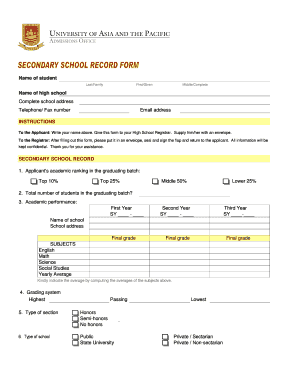
- In the top section, enter the name of the student in the designated fields: last/family name, first/given name, and middle/complete name.
- Fill in the name of the high school and its complete address, including the telephone and fax number.
- Provide an email address for further communication regarding the application.
- Follow the instructions for both the applicant and the registrar, ensuring that the form is exchanged and handled confidentially.
- Under the secondary school record section, indicate the applicant's academic ranking and the total number of students in their graduating class.
- Record the academic performance for each year level. Enter the school year (SY) and final grades for the first, second, and third years.
- List the subjects studied, such as English, Math, Science, and Social Studies, and compute the yearly average for these subjects.
- Select the grading system used—either highest, passing, or lowest—appropriate to the institution.
- Indicate the type of section the applicant is aiming for—honors, semi-honors, or no honors.
- Specify the type of school the applicant attends—public, state university, private sectarian, or private non-sectarian.
- Answer whether the applicant has failed any subject(s) and, if so, fill out the requested table with subjects failed and corresponding grades.
- Indicate whether the applicant has repeated any year level and provide the year if applicable.
- Ensure the registrar provides their signature, affixes the school dry seal, and enters the date and name.
- After completing the form, save changes, download it, print it out, or share it as required.
Start filling out your admission forms online today to ensure a smooth application process.
If you want your school application letter to stand out to the admissions committee, here are the steps to follow: Address your letter. ... Use proper salutation. ... Create a subject line. ... Introduce yourself, your purpose and your interests. ... Highlight your skills and achievements. ... Reiterate your interest. ... Thank the reviewer.